AI video ads work. Not how most operators try to use them — but absolutely if you architect the workflow correctly.
The mistake most operators make: they try to run AI video as one monolithic generation. Type a prompt, hope a 30-second winning ad comes out the other side. That's not how this works. The voiceover will glitch, the cuts will jump, the character will drift, the script will land at the wrong beat. End-to-end on autopilot doesn't ship.
The fix is separating the layers and using the right tool for each one:
- Claude + Seedance for the visual generation — image-to-video with first-frame/last-frame chaining so transitions stay clean across cuts
- Claude for the cleanup + stitch — auto-concatenates the clips, you review and reroll the ones that broke
- ElevenLabs for the voiceover — handled as its own layer, generated separately, swapped in over muted clips
- OR write the script to fit the shot length — short, punchy lines built to be spoken in the exact clip duration, instead of cramming dense narration into AI-generated speech that can't keep up
Layered correctly, the workflow ships launch-ready video at $12-15 per 70-second ad — 30-100x cheaper than agency UGC platforms. Layered wrong, it ships AI-slop you can't use.
The applications where this actually prints today:
- Claymation, stop-motion, and stylized animation — the format hides AI artifacts as part of the aesthetic
- Short-form clips (10-15 seconds) built off winning Catalyst or Native ads — easier to execute well at short length
- AI UGC video for low-cost angle testing — when you're not ready to retainer real creators yet
- B-roll asset library generation for future video production
This sub-page covers exactly how to architect each layer. Same example product as Native + Catalyst — Microingredients Astaxanthin — built end-to-end as a 70-second claymation tanning ad. Workflow: script → shot-by-shot keyframes (using the imagen skill from the Native sub-page) → image-to-video → stitch → voiceover layer → ship.
Why image-to-video beats text-to-video
Most operators hear "AI video" and think of text-to-video — type a prompt, get a video. That's the wrong tool for direct response.
Text-to-video is unpredictable. Same prompt run twice gives you different actors, different framing, different pacing. Useless for ad consistency.
Image-to-video gives you control. You generate the still images first (using the imagen skill — covered in Native sub-page). Each generated image is a keyframe. Then you feed the keyframes into a video model and it animates between them. The actor is locked. The framing is locked. The product packaging is locked. You control every frame, the AI just animates the in-between.
The killer feature: first-frame + last-frame chaining.
Seedance 2.0 (the model I use most) accepts both a first frame URL and a last frame URL for each clip. This means clip A's last frame can be clip B's first frame — smooth transitions, no jump cuts, the actor doesn't teleport. Multi-clip videos stitch together as one continuous piece.
Without this mechanic, multi-clip AI video looks like a slideshow. With it, it looks like an actual ad.
Setup: Kie.AI + Seedance
The video model I use is Seedance 2.0, accessed via Kie.AI.
Kie.AI is an API aggregator that gives you one billing account across multiple AI video and image models — Seedance 2.0, Sora 2 Pro, Wan, Veo, Kling, Grok Magic, GPT Image 2, and others. No monthly subscription, runs on credits, way cheaper than Higgs Field or running each model's API directly.
Setup is the same pattern as the imagen skill from the Native sub-page:
Step 1 — Sign up for Kie.AI. Use this link: https://kie.ai?ref=293a850ba89a1cc78ef7cb7477219014
Step 2 — Generate an API key. Inside Kie.AI → API Keys → Create New Key. Name it specifically per brand or use case (same logic as the Google AI Studio key from the Native sub-page).
Step 3 — Tell Claude to build the skill. Drop the API key into Claude with the skill creator prompt. "Build a skill that runs image-to-video generation through Kie.AI's Seedance 2.0 model. Handle errors, retry failed generations, support first-frame and last-frame inputs, and stitch the output clips together."
Step 4 — Test on a single clip. Provide a first-frame image, last-frame image, and a motion prompt. Let Claude run the test. Verify the .mp4 outputs to your local file system or Google Drive.
Step 5 — Save as a Claude skill. "Save this as a skill named [seedance-image-to-video]." Now it's in your Customize → Skills sidebar, available across all chats.
The skill code with my 8 iterations of error handling, prompt structure, and stitching logic is gatekept in the masterclass. The basic version you'd build from scratch works — mine is just more reliable because every error case I've hit got baked back into the skill.
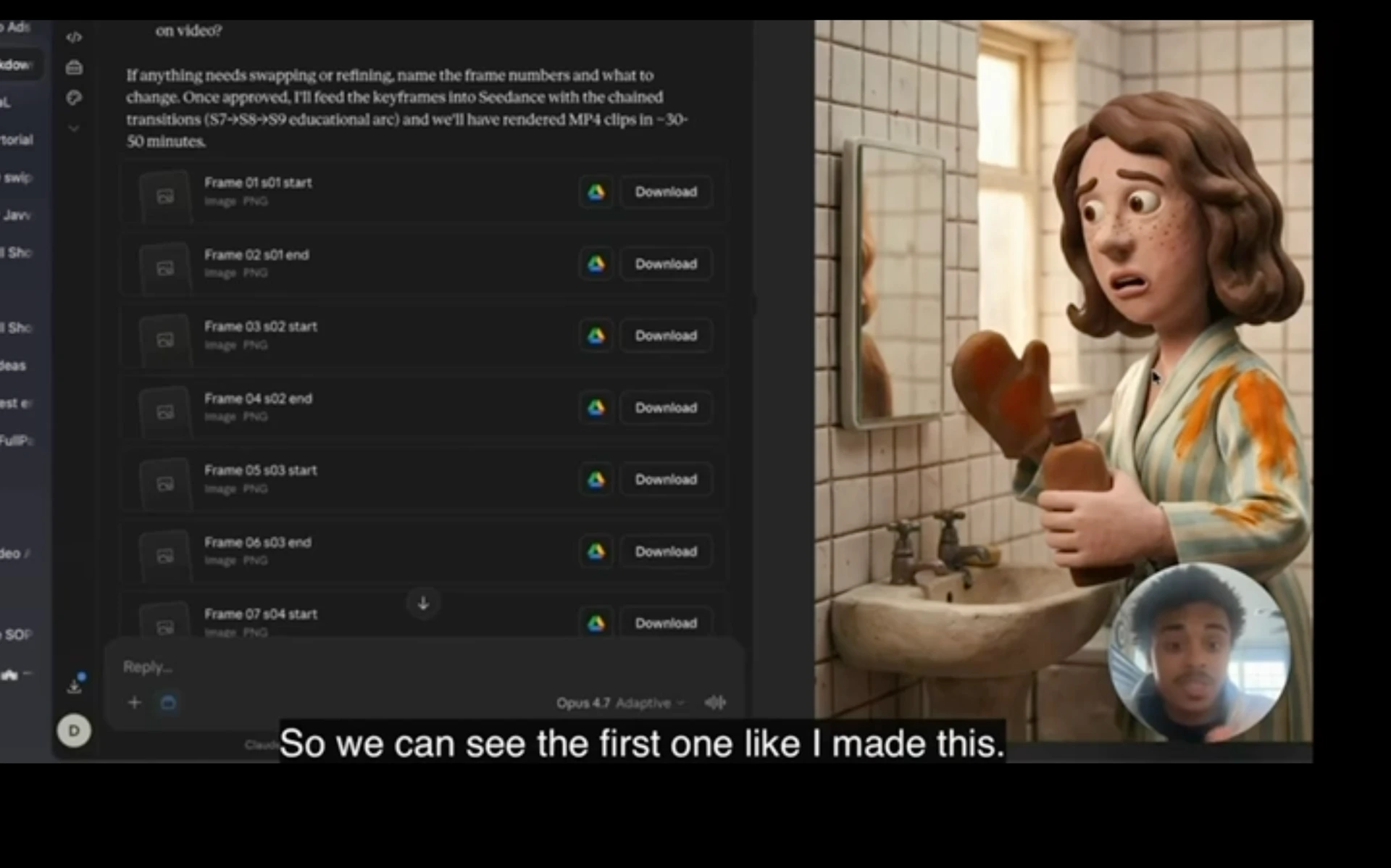
The full workflow at a glance
- Find a source ad to rip — Twitter bookmarks, BrandSearch, swipe files
- Shot-by-shot analysis — drop the source video into Claude, extract the structure
- Adapt to your avatar — generate concepts with shot-by-shot breakdowns
- Script iteration — kill the AI voice, add the Brandon-rule specificity
- Generate keyframes — use the imagen skill (Native sub-page) for first/last frame of each clip
- Generate clips — Seedance via Kie.AI, first-frame + last-frame chained
- Stitch + review — Claude auto-stitches, you review for errors
- Audio layer — ElevenLabs voiceover, swap in over the muted clips
- Iterate — fix what broke, bake the learnings into the skill
Step 1 — Rip a winning source ad
Same swipe file principle as the Advertorial sub-page. You don't start with a blank page. You start with an ad that's already winning in the wild and adapt it to your avatar.
Where I find them:
- Twitter bookmarks — accounts like Alex Fedotoff, ecom creative strategists, ad-format swipe accounts. Bookmark the ones that hit. I rarely scroll Twitter actively (it's a focus killer) but the bookmarks accumulate from when I am on there.
- BrandSearch — competitor ad research. Filter by category, video length, spend level. Pull what's actually running.
- Manual hunt — when an ad stops you in your own scroll, save it. Build your personal swipe file over time.
The actual rip:
Find an ad. Save the .mp4 (Twitter Video Downloader works for tweets — paste the link, get the file).
For the Microingredients walkthrough, I picked a Penrose Body Butter claymation ad ("Did you know most guys are wearing cologne wrong? I don't mean how much you spray. I mean what's underneath it."). The format was claymation, the structure was contrarian-hook → mechanism reveal → product → CTA. Both elements I wanted to adapt for tanning.
Step 2 — Shot-by-shot analysis via Gemini API in Claude
Drop the .mp4 into Claude with the video analysis prompt:
"Use the Gemini API to fully analyze and break down this ad. Transcript shot-by-shot at 0.5-second intervals. Identify the design, animation style, voiceover script, hook architecture, structural beats. Make me a 100/100-level video breakdown."
Claude calls Gemini's video analysis API in the background, processes the .mp4, returns a structured breakdown. For the Penrose ad, I got back:
- Full voiceover transcript with exact timing
- Shot-by-shot list at 0.5-second intervals — every cut, every camera move, every visual change
- Hook architecture: contrarian opener → conspiratorial mechanism → solution failure → product intro → social proof
- Animation style notes: claymation, stop-motion, "Chicken Run feel," exaggerated character expressions
- Pacing analysis: shot lengths, when the dialogue accelerates, when the cuts get faster
This is the source material for everything downstream. You're not copying the ad — you're extracting the structural DNA so you can rebuild it for your avatar with your product and your angle.
The video analysis prompt is gatekept in masterclass.
Step 3 — Adapt to your avatar
Same avatar work as Native + Catalyst — pulled from the same Claude project (Breakthrough Advertising, DTC masterclass transcript, band patterns doc). For Microingredients:
- Pale woman, late 30s-40s, married with two kids
- Awareness stage: problem-aware (knows tan supplements exist, doesn't trust them)
- Unspoken desire: "I want that warm tan, golden-hour glow without sun damage. The pale girl's dream."
- Internal monologue: "Dull, washed out, puffy, like I slept badly. Skincare can't fix this."
I told Claude:
"Adapt the Penrose ad framework into 5 possible shot frames for our avatar. Same animation style (claymation), same speed, same architectural beats (hook → mechanism → product → CTA), but our voiceover, our product, our visual world. Each concept full shot-by-shot. Use the project knowledge for awareness/sophistication mapping."
Got back 5 concepts. Picked the strongest 2:
Concept 1 — "When you're tanning wrong" — closed-loop educational hook structure, mirrors Penrose's contrarian opener.
Concept 3 — "Why Hokkaido fishermen's wives don't age" — 1991 Japanese village story angle. A team of dermatologists from Tokyo found 60-year-olds with the skin tone of 30-year-olds. They thought it was genetics. It wasn't.
For the masterclass walkthrough, I built Concept 1 end-to-end. The Hokkaido one is sitting in my queue for a future iteration.
Step 4 — Script iteration (kill the AI voice)
Same discipline as Native sub-page. Read every line. Replace AI patterns. Add Brandon-rule specificity.
For Concept 1, the V1 hook from Claude was:
"Did you know most women who want to tan are doing it wrong? I don't mean their SPF. I mean what's happening under their skin."
Sounded fine. Wasn't sticky enough.
V2 after iteration:
"97% of women who want to tan are still doing it wrong. Experts show that it's not because of their SPF or what time of day they go out for UV. It's actually about what is happening underneath your skin before the sun even gets the chance to touch it."
What changed: specific number (97%) instead of "most." Specificity in the dismissal ("not their SPF or what time of day"). The "before the sun even gets the chance to touch it" language is more visceral than "what's happening under their skin."
Mid-script, the V1 said:
"Wondering why every woman in your group chat looks lit from within and you look photographed under fluorescents."
I cut the "lit from within" — vague AI cliché. After iteration:
"...wondering why every woman on Instagram looks like God's favorite, and you look like he forgot to add the color."
Why this is better: "God's favorite" is a specific phrase the avatar would actually use with herself. "He forgot to add the color" is a punchline that lands. Both are pulled from how women I know actually talk about themselves when they're feeling invisible.
Brandon-rule for video scripts: read every line out loud. If you can't say it without sounding like a brand commercial, rewrite it. Real human speech has rhythm, irregularity, specificity. AI-generated copy has the opposite — clean rhythm, perfect parallelism, generic descriptors. Hunt for the AI tells and replace them.
The full script iteration prompt + the band patterns specifically tuned for video voiceover is gatekept in masterclass.
Step 5 — Generate keyframes via the imagen skill
This is where the Native sub-page workflow plugs directly in. The same imagen skill that generates static ad images is what generates the keyframes for video.
For each clip in the video, you need:
- Start keyframe (first frame the model sees)
- End keyframe (last frame the model sees)
- The model animates between them
For a ~70-second video at 7 clips × ~10 seconds each, that's 14 keyframes minimum. I generated 30 keyframes for our example to allow for character continuity across the cuts and product shots inside individual clips.
The character lock:
For consistent character across clips, the keyframe prompt includes the same character description every time. For our example: "Linda — pale Irish skin tone, late 30s, soft brown hair with freckles, expressive eyes, claymation style matched to Aardman / Chicken Run aesthetic."
Every keyframe references "Linda." She's recognizable across the entire video.
The product reference:
For product shots specifically, you must provide a reference image of the actual product. AI will hallucinate packaging, label text, container shape. Drop in the real packshot, tell Claude to use it as the visual reference, the keyframes come out matching the real product.
For Microingredients Astaxanthin, I had Claude pull the public Amazon image of the bag and use it as the reference. The final product shots in the video matched the real product almost exactly.
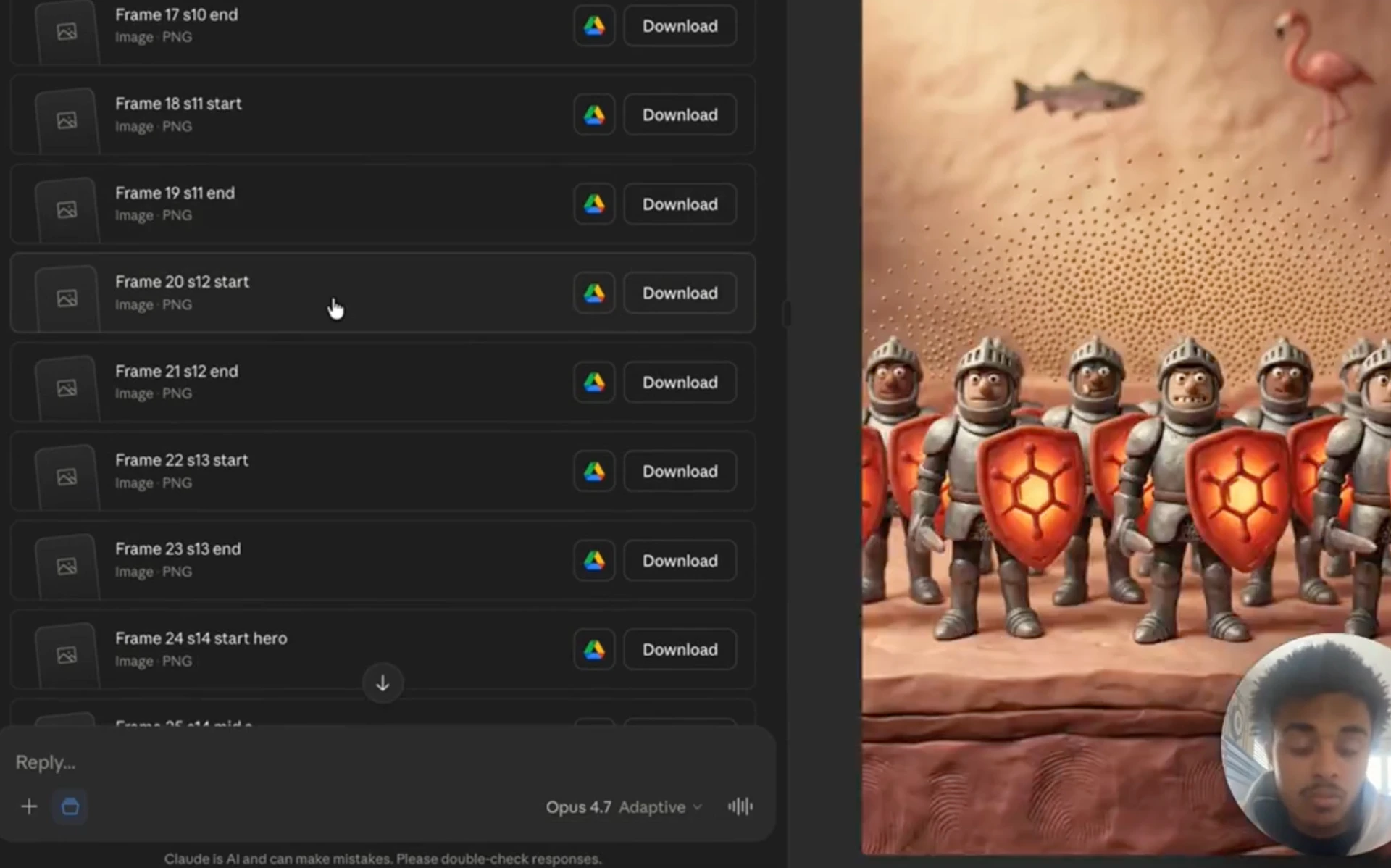
Generation time: ~15 minutes for 30 keyframes. Claude runs them all sequentially through the Nano Banana 2 API, retries any that error, returns the full set inline + saves to your file system.
Review pass: look at every keyframe. Some will be wrong (her tan didn't show up, the calendar in the frame has the wrong number of days, the product shot has a typo on the label). Tell Claude which ones to regenerate with what changes. Iterate until every keyframe lands.
Step 6 — First-frame/last-frame chaining
This is THE move for multi-clip videos.
Each Seedance generation accepts:
- First frame URL — the still image where the clip starts
- Last frame URL — the still image where the clip ends
- Motion prompt — what should happen between them
The chain principle: clip A's last frame = clip B's first frame.
If clip A ends with Linda holding the product up to her face, clip B starts with the same Linda holding the same product in the same position. Seedance animates between them — no jump cut, no character change, no teleportation.
Across 7 clips, this means 6 transition points where the character must hold continuity. The keyframes are designed for this from the start — same Linda, same product, same lighting, same pose at the cut points.
Without this discipline, multi-clip AI video looks like a slideshow. With it, it looks like an actual edited video.
The first-frame/last-frame chaining logic is gatekept in masterclass — it lives inside the Seedance Claude skill.
Step 7 — Generate clips via Seedance
Once keyframes are locked, Claude pushes each clip through the Seedance skill.
Per clip, Claude builds:
- Global locks: style (claymation), voiceover (Linda's voice), character (Linda the avatar), no subtitles, no captions
- Per-clip locks: first frame URL, last frame URL, motion prompt with timing beats, audio specification
- Output format: 9:16 vertical, MP4, audio embedded
Cost preview: Claude shows the estimated cost before running. For our 70-second, 7-clip video: ~$12.50. That's 7 clips × ~$1.80 each. Approval gate before spending — Brandon-rule about being skeptical of automated cost.
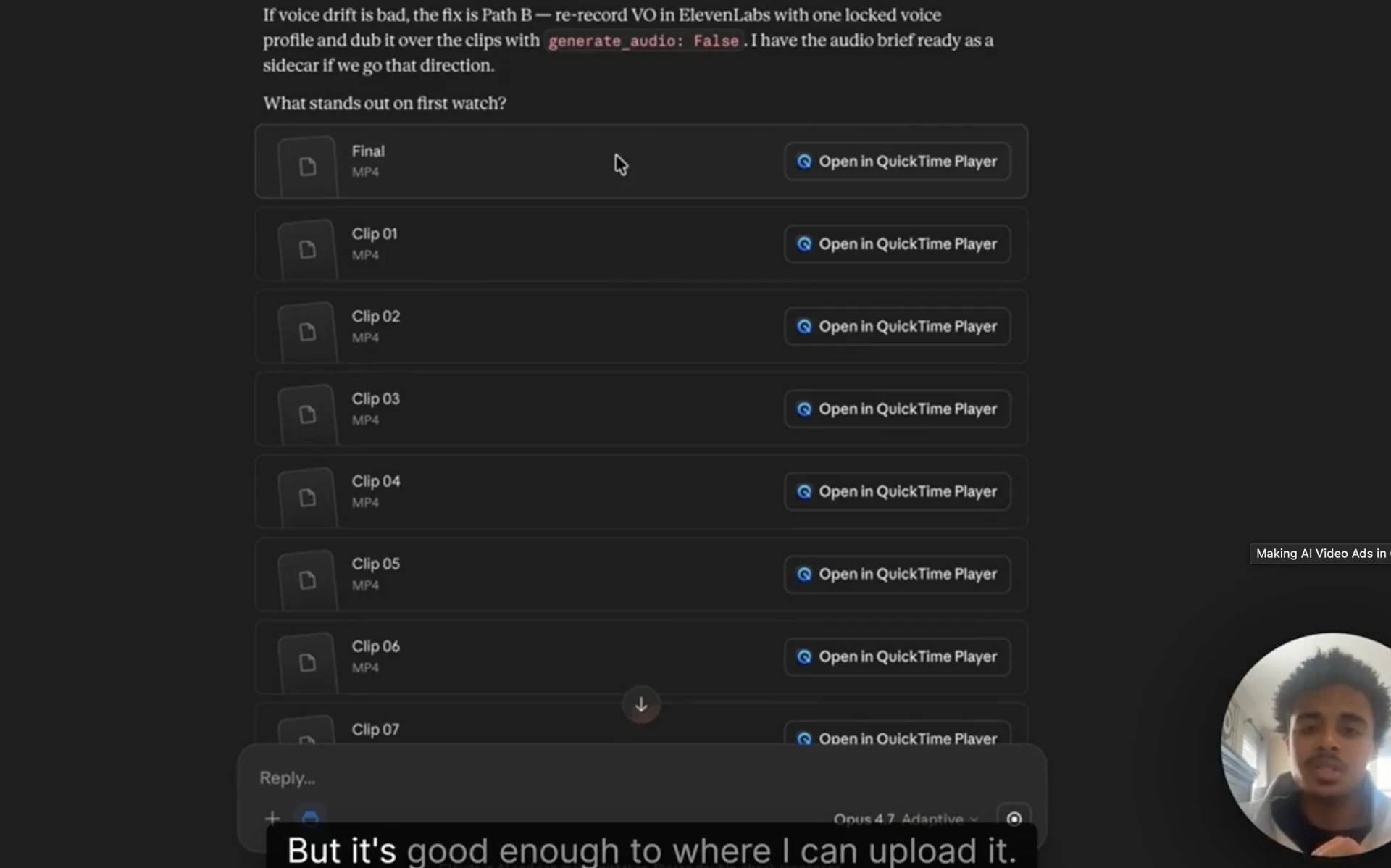
Run time: roughly 20-25 minutes for the full video to generate. Claude saves each clip directly to your local file system as it completes. You can watch them come in one at a time.
The auto-stitch: once all 7 clips are generated, Claude concatenates them into a single .mp4. The first-frame/last-frame chaining keeps the cuts seamless.
Step 8 — Review the stitched video honestly
This is where the honesty comes in.
Brandon-rule from Native: be more skeptical of AI output than pro it. That applies harder for video than for images.
For our Microingredients walkthrough, the first stitched output had:
- Voiceover quality issues — Seedance generates speech alongside the video, but the speed inconsistencies are noticeable. Some lines accelerate, some pause weirdly.
- A few transition errors — clip 4 to clip 5 had a subtle character continuity break (Linda's hair shifted slightly).
- One frame artifact — a calendar in the background had a typo on the date.
- Pacing inconsistency — the script said "97% of women" but the on-screen pacing made it land at the wrong beat.
Honest assessment: decent enough to launch as a low-cost test, not banger quality, would not run at scale until iterated.
Step 9 — The audio fix (this is the big one)
Don't rely on Seedance for voiceover. The visual model is solid, the voice synthesis is iffy. Separate the layers.
The fix:
- Re-run the same clips with audio: false in the Seedance prompt — visual + FX sounds only, no spoken voiceover
- Take the muted video to ElevenLabs
- Generate the voiceover at high quality with a real-sounding voice clone
- Stitch the ElevenLabs audio over the Seedance video
This single fix takes the output from "decent test" to "good enough to scale." ElevenLabs voice quality is at the level of a real creator voiceover. Seedance handles the visual. Right tool for the right layer.
The optional automation: plug ElevenLabs API into Claude as another skill (same pattern as the imagen and Seedance skills). Claude generates the voiceover, downloads the audio, syncs to the muted video, exports the final. End-to-end automation.
I've personally pulled back on full automation here — at some point you're automating a layer that benefits from a video editor's eye. My current workflow: Claude generates the visual + ElevenLabs handles the voiceover + a video editor does the final sync and timing polish. Three layers, each in the right tool.
The full ElevenLabs integration setup is gatekept in masterclass.
The 8-iteration learning curve
Don't expect the first attempt to ship. Expect 5-8 iterations on the workflow before you're shipping launch-ready videos.
My iteration arc on this:
- Iteration 1: Bad. Used as a weird ad to drive Catalyst clicks to an advertorial. Got some traction.
- Iteration 2: Tried to match a complex source ad. Came out worse. Didn't launch.
- Iteration 3-4: Refined the keyframe generation. Better character continuity, better product shots.
- Iteration 5: First version I'd actually launch as a real ad. Got purchases.
- Iterations 6-8: Tightened the voiceover layer (added ElevenLabs). Better pacing. Better script iteration discipline.
Current state: 30-50 second AI claymation videos with few enough errors to run as paid ads, decent spend, decent purchase conversion. Not crushing yet. Not winners-of-the-quarter level.
This is the truth of where AI video is in late 2025 / early 2026. Useful for specific applications, not yet at parity with hired creators for hero ads.
What I'm doing with the iterations: every error I hit gets baked back into the Seedance Claude skill. Wrong character continuity → updated character lock template. Bad transitions → tightened first/last frame chaining logic. Audio sync issues → moved to ElevenLabs separation. Each iteration is a permanent improvement to the skill, not a one-off fix.
This is the compounding leverage of skills (Module 3 main page principle): every iteration permanently improves the workflow for every future video. The skill at iteration 8 produces dramatically better video than the skill at iteration 1, and I never have to re-learn the lessons.
The shorter-clip alternative (the move that's actually printing)
The honest play right now isn't to make 70-second AI video ads. It's to make 12-second clips.
Take a winning Catalyst or Native ad. Convert the static image to a 5-second animated clip. Add primary text on top. Send to the same advertorial.
This works because:
- Short clips have fewer transition points — less chance for AI artifacts to break immersion
- The script is already proven — you're amplifying a winning hook, not creating a new one
- The visual is already proven — you're animating a static image that already converts
- Production cost is minimal — single clip, no stitching, often under $2
Brandon-rule: the simplest version of the workflow is usually what's working right now. I've gotten one of my current winners by doing this exact move — took a static Catalyst ad that was performing, animated the image to a 12-second clip with subtle motion (camera dolly + character expression shift), added primary text matching the original ad copy, ran it as a Spark ad. Better than the static. Now feeds the same advertorial.
For most operators reading this case study, start here. The 70-second hero claymation ad is the advanced workflow. The 12-second iteration on a winning static is the entry point.
The B-roll library compounding effect
Every clip you generate with this workflow becomes a permanent asset. Save them.
Setup:
- Google Sheet with naming conventions (brand, concept, clip type, length, character, product)
- CDN URLs for each clip (uploaded to Shopify Files or your storage of choice)
- Tags for searchability (animation style, character demographic, product type, scene type)
Future videos pull from the library. "I need a claymation shot of a pale woman holding a supplement bottle in a bathroom mirror — pull existing or generate new?" Most of the time, existing works. Pull the URL, drop into the new video.
This is the same B-roll library principle from Module 1 (Recharm reference) and Module 2 (UGC creators). Volume of content compounds when each piece of content is permanently catalogued and reusable.
The B-roll library naming conventions + the Google Sheet template I use for AI video assets is gatekept in masterclass.
Cost economics — the leverage layer
Quick math for context.
AI video pipeline (Seedance + imagen + Claude API):
- ~70-second video, 7 clips: ~$12.50 total
- Claude API charges for keyframe generation + workflow orchestration: pennies
- ElevenLabs voiceover (when added): ~$1-2 per video
- Effective cost per finished video: ~$14-15
Traditional UGC pipeline:
- Single video from agency platform: $300-1500
- Retainer model with creator: $20/video at the math from Module 2's UGC sub-page
- Custom video production: $500-3000/video
The math:
- vs agency rate ($800 average): 53x cheaper
- vs retainer rate ($20/video): roughly comparable, BUT retainer requires a real human producing video, which isn't possible for stylized animation (claymation, stop-motion, weird/creative concepts)
- vs custom production ($1500 average): 100x cheaper
The leverage isn't replacing all UGC. It's filling specific gaps:
- Animation styles you can't get from real creators
- High-volume cheap testing on new angles before committing to retainer
- Short clips off winning static ads
- B-roll asset generation for future video production
When the math is 50-100x cheaper per piece for the right application, even imperfect quality is worth it. You ship 50 AI animation tests for the cost of 1 traditional video, find the 2-3 that work, scale those.
Worked example — the Microingredients claymation tanning ad
Final spec for the ad I built end-to-end during the masterclass video:
Format: 70-second claymation, 9:16 vertical, no on-screen captions
Style: Aardman / Chicken Run aesthetic, warm color palette, exaggerated character expressions
Character: Linda — pale Irish skin tone, late 30s, claymation expression-driven
Product: Microingredients Astaxanthin (real packshot used as reference)
Voiceover: ElevenLabs (separate from Seedance generation)
Total clips: 7
Total cost: $12.50 (Seedance) + ~$1.50 (ElevenLabs voiceover) + Claude API charges (pennies)
Total time: ~45 minutes of active work + 25 minutes of generation wait
Iterations to launch-ready: this was iteration 5 for me on this workflow
Honest assessment: decent. Some character continuity drift between clips 4-5. Voiceover is solid (post-ElevenLabs). The product shot lands. The animation style hides most of the AI artifacts. Worth running as a paid test for under $20 of production cost.
Why this is gatekept
The principles are here. The actual files live in the masterclass:
- The Seedance Claude skill at iteration 8 (with all error handling, retry logic, first/last-frame chaining)
- The Gemini API competitor ad analysis prompt (the shot-by-shot extraction one)
- The full character lock template + global locks structure for Seedance prompts
- The B-roll library Google Sheet template + naming convention
- The ElevenLabs voiceover integration setup
- Live updates as new video models drop (Sora 2 Pro, Veo, Wan 2.0 — the model landscape changes biweekly)
- The 12-second short-clip workflow optimization (the one currently winning)
- Iteration log showing what broke and what got fixed across all 8 iterations
Every one of these took dozens of hours to build, test, and iterate. The masterclass version stays current as I push the workflow further across my brands.
Want the full Seedance skill, the B-roll library template, the ElevenLabs integration, and the live model updates I push biweekly? All inside the RunItUp Masterclass → Join here
Join now to lock in your rate, prices are increasing quickly.