This is the full workflow. Setup → research → copy → iteration → images → launch. Walked through start to finish using Microingredients Astaxanthin as the example product — pulled from Amazon as a public stand-in to demo the workflow without touching any of my own brand assets.
If you watched the masterclass video version of this, you've already seen me make this in real-time over about 50 minutes. This sub-page is the written version + the principles distilled out. The masterclass is where the prompts and skills live.
By the end of this, you should be able to: spin up a fresh Claude project for any brand, run market research + read through it, pick angles, write native ad copy that doesn't sound like AI, generate concept-matched images via the imagen skill, and launch as flexible ads. All in a single afternoon.
What you need set up before we start
The project setup is the leverage point. If you skip this, every chat starts from zero context and your output is mid.
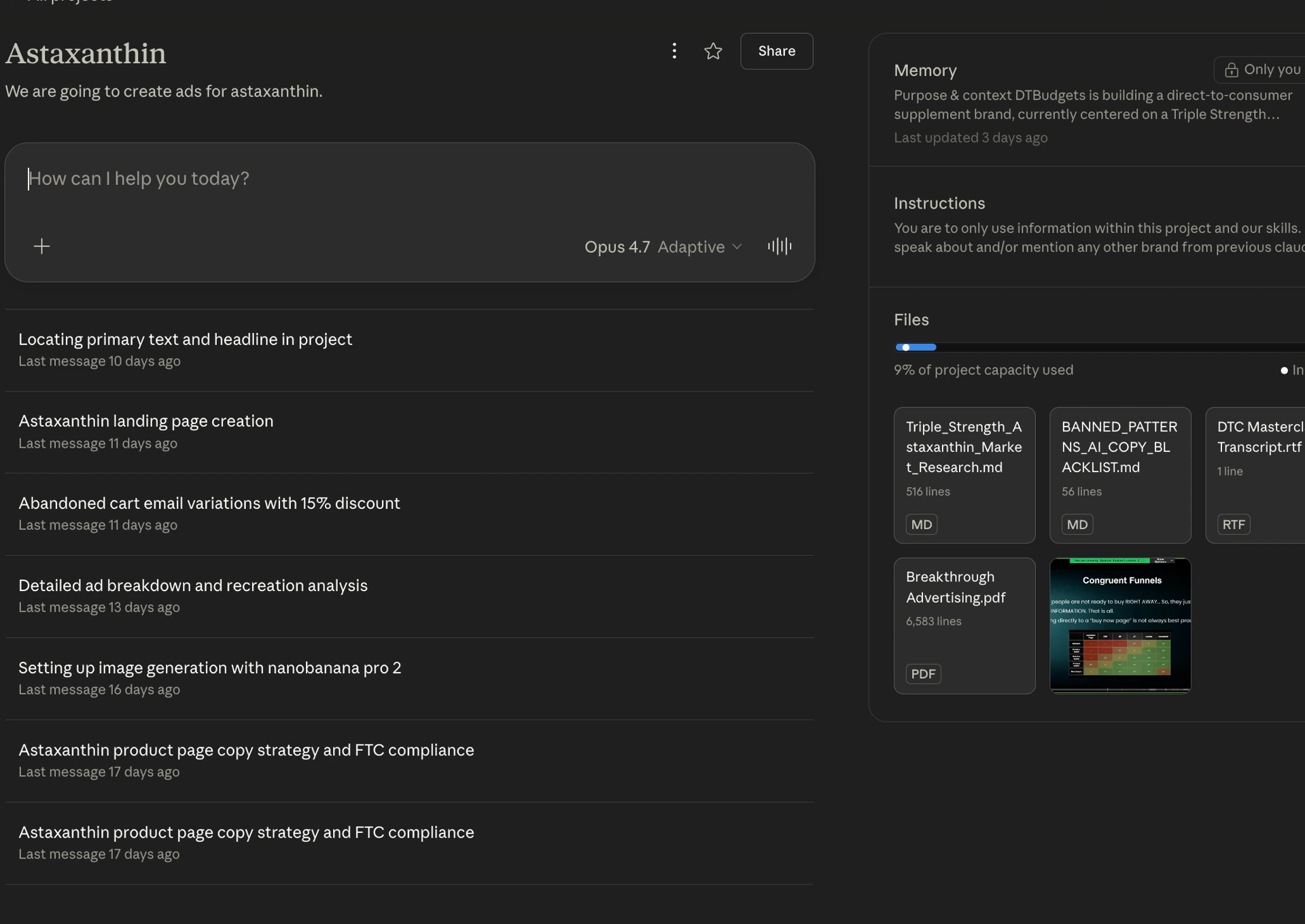
Create a Claude Project for the brand. Upload these documents to the project knowledge:
- Congruent Funnels Matrix — my framework for mapping awareness stages to landing page types. Without this, Claude doesn't know how to ladder copy to the buyer's mental state.
- Breakthrough Advertising (Eugene Schwartz) — the foundational text on awareness, sophistication, mass desire. Way smarter than I am. I let Claude pull from it directly.
- DTC Masterclass Transcript — full podcast between Ryan Clogg and Julius. Two of the highest-level copywriters in the space. I use this as a craft reference in every project now.
- Band Patterns doc — this is the secret weapon. It documents the patterns Claude defaults to when writing (the "triple short sentence stack," forced parallel repetition, all the AI tells) and tells Claude to kill them. Without this doc, your copy reads AI-generated. With it, it reads human.
These four documents are gatekept inside the masterclass. They're the compressed form of months of source material curation. Each one I built or sourced specifically because I noticed copy quality dropping without it.
Confirm Claude is on:
- Desktop app (not browser). Faster, better connectors, supports parallel chats.
- Claude in Chrome extension installed (covered in the main page).
- Connectors active — Google Drive at minimum. If you connect Drive, image outputs and copy can save directly to your computer's file system, which is huge for native ad batch production.
- Claude Co-work set up. This is what lets Claude actually navigate browsers and execute multi-step automations.
If any of this is missing, go back to the main page setup section and finish that first. The rest of this sub-page assumes all of it is running.
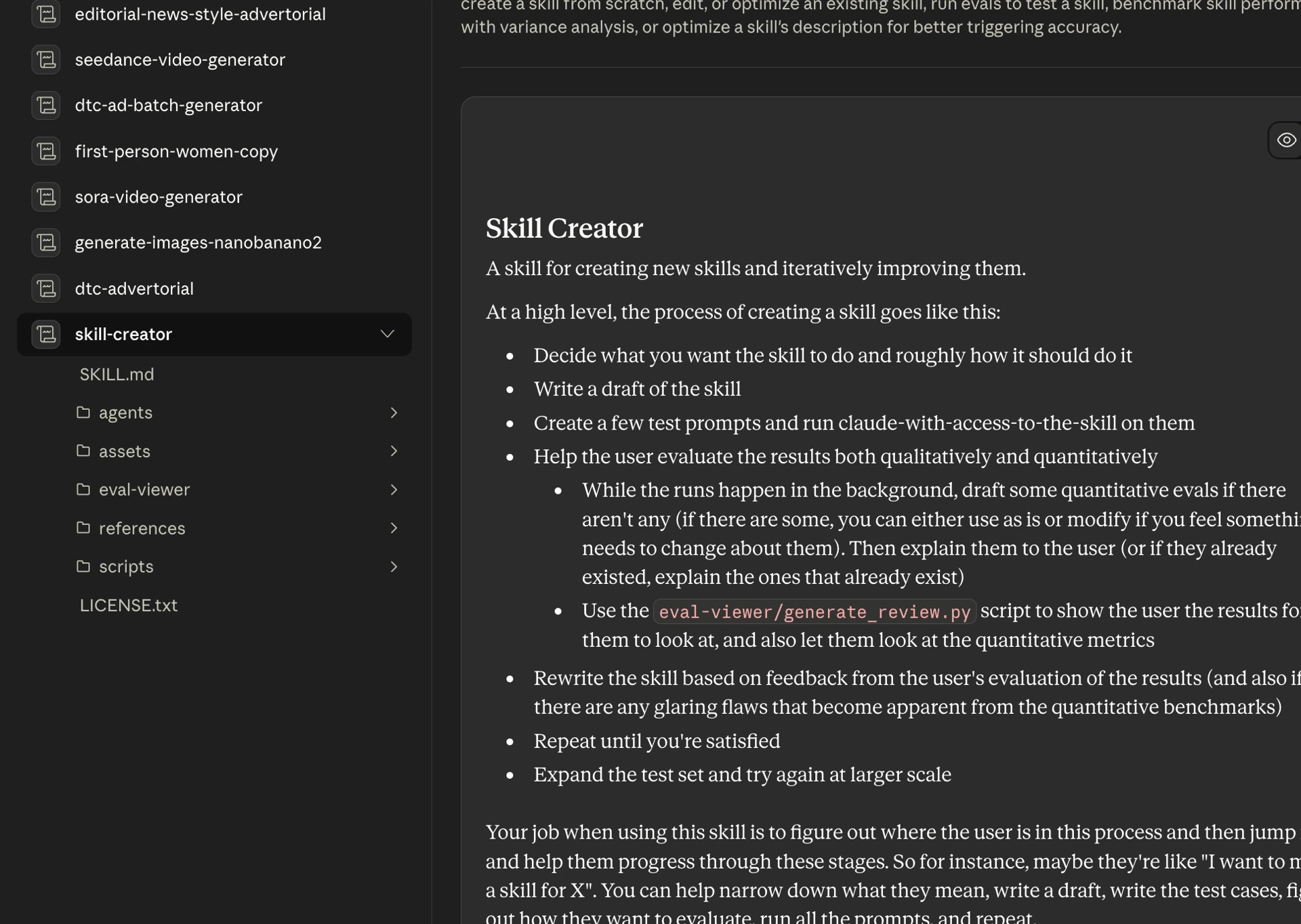
Setting up the imagen skill
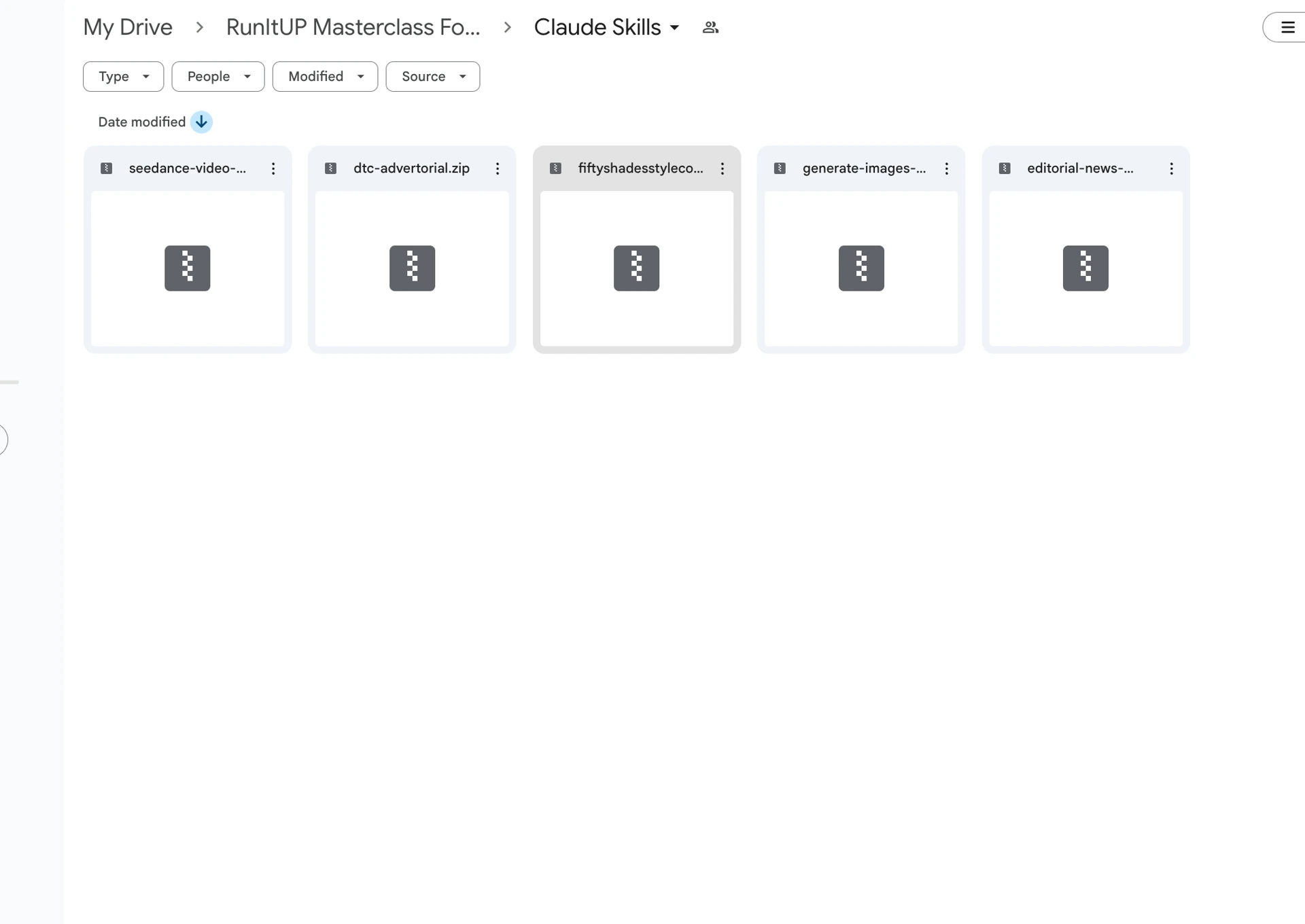
If you came in through the lead magnet email sequence, you got the imagen skill (.zip) in email 2. Drop it into Customize → Skills → upload, and you're done. Skip ahead to the research section.
If you want to understand how the skill was built (or build a custom one for your own use), here's the exact setup. This is what I walked through in the masterclass video.
Step 1 — Get a Google AI Studio API key.
Go to Google AI Studio. Scroll to the bottom of the homepage. Click Get API Key → Create API Key. Name it specifically for this use case — I name mine per brand or per project (e.g. "Imagen Test - [Brand]"). Reason: API keys can leak, and if one does, you want to know exactly which workflow it belonged to so you can revoke it without taking everything else down.
Copy the key. Don't paste it anywhere shared.
Step 2 — Tell Claude to build the skill.
In a fresh Claude chat, you give it the skill creator prompt (the meta one — gatekept in masterclass, but the principle is: tell Claude to build a reusable skill that takes image prompts as input and outputs generated images via the API).
Paste your API key. Tell Claude:
Set up the skill. Test it on this prompt: [insert any test prompt — I used "Black man with dreads sitting at a desk in a meeting room, dramatic lighting" as my throwaway test].
Claude will:
- Look up available image gen models on Google AI Studio
- Find Nano Banana 2 (Google's current top image model — the one you actually want)
- Write the skill code wrapping the API call
- Run the test prompt against the API
- Output the test image inline
If Google Drive is connected, Claude saves the output there too. If Co-work is set up to write to local files, the image lands directly in your computer's file system.
Step 3 — Save as a Claude skill.
Once the test works, tell Claude: "Save this as a skill named [whatever]." I name mine "Imagen Gen Skill - [Brand]" so they're scoped per project.
Now the skill is in your library. Available across all your chats, on desktop AND browser. Generate images by name-dropping the skill in any future chat.
Cost: I've run thousands of images through this skill across my brands. Total API spend has been in the single-digit dollars per month. The Claude API charges are pennies per image. Compare to paying $50–200/month for an image gen tool subscription with rate limits.
The basic skill is what you got in email 2 (with my API key removed — you plug in your own per the steps above). The advanced version with auto-iteration loops, the JSON spec format I use for storyboarding, and the full prompt library lives inside the masterclass.
Running market research in parallel
This is where the parallel chats move from the main page actually pays off. While the imagen skill setup is running in one chat, you spin up a second chat for market research.
Chat A: Imagen skill setup (ongoing — Claude is testing the API).
Chat B: Market research — a fresh chat in the same project. Paste in your product page content + product page link as initial context. Then run your market research prompt.
The market research prompt I use is dense — it produces ~10 pages of avatar voice, awareness mapping, sophistication level, persona variants, and competitor analysis. It runs for roughly an hour.
Don't skip the prompt by doing surface-level "give me a target audience" queries. The depth of the research is what every downstream step (concept selection, copy, image direction) gets built on top of. Garbage in, garbage out.
The market research prompt is gatekept in masterclass.
While that's running, you finish the imagen skill setup in Chat A. Both chats finish around the same time. Now you have an imagen skill ready AND market research deep enough to build a real campaign on.
Same project, two chats, parallel work. This is the move. Single-threaded operators take 3 hours doing this. You take 1.
Reading the market research
Hard truth: you have to actually read this. Claude can't do everything for you. The research doc is dense and you need to extract patterns by hand.
I keep a notebook open while reading. As I find patterns, I copy them into a Google Doc that becomes my "ad concept input" for the next phase. (You can also have Claude pre-summarize, but the act of reading and noting yourself is what builds your intuition for what's worth testing.)
What you're looking for:
- Awareness stages present in the market — what % of buyers are unaware vs problem-aware vs solution-aware vs product-aware? This determines which angles to test first.
- Sophistication level — what's the market's level of pattern-recognition for category claims? In the astaxanthin / internal-tanning supplement market right now, sophistication is level 4-5: mechanism-specific, ingredient-specific, third-party-tested. "Just tan from inside" doesn't cut it anymore.
- Emotional language — direct phrases from real reviews and forum posts. e.g. "I look tired in every photo," "I don't recognize myself in the mirror anymore," "my skin reads dull in indoor light." These become hook material verbatim.
- Mechanism angles — what specific biology/chemistry can you point to? For tanning: melanin vs carotenoid pigment, NCP for absorption, DHA staining of dead skin cells in self-tanners. Each one is a teachable mechanism that turns into a hook.
- Persona variants — different avatars within the same buyer pool. Younger women (30s-40s, mom of two, "I want to look less tired in school pickup line") vs elderly women (60s+, "I want to feel like I'm actively doing anti-aging, not just reacting to it"). Same product, very different emotional triggers.
- Adjacent trending niches you can pull from — for tanning, the melanotin/peptide niche is rising. r/Peptides has 70k weekly visitors, ~600k recent peptide-survey size, 281 in Google Trends, 400 on Instagram. Not enough to build a brand around, but enough to test as a fourth ad concept aimed at that niche.
- Skeptical-but-hopeful key language — "my skin has this warm natural glow," "I didn't burn this quickly," "I've tried every serum," "I feel seen," "pale girl's dream." Direct quotes you weave into the body copy.
- Reader objections to address — "I'd rather spend money on the kids than myself," "another supplement that doesn't work." You either reframe these inside the copy (analogy: pour into yourself, your cup overflows, the family benefits from a fuller version of you) or you skip them entirely.
By the end of the read-through, I have ~5 angle ideas, each tied to a persona, an awareness stage, and a sophistication level. Five, not one. Native ads work as a portfolio of tests, not a single hero ad.
Picking the first concept
You can't write 5 ads in one session and produce all of them well. Pick one.
The concept selection rule: start with the easiest conversion. That's almost always solution-aware, mechanism-specific, with a clear identity hook.
For Microingredients Astaxanthin, the five angles I pulled were:
- "Third-party tested" mechanism angle (solution-aware, easier convert) — handles the objection that supplements lie about ingredients
- Emotional "I look tired" angle (problem-aware) — taps loss-of-vitality identity
- Tanning peptide / melanotin adjacent (solution-aware, niche pull) — pulls from a trending sub-market
- Anti-aging for elderly women (different persona, problem-aware) — same product, older avatar
- First-person "pale girl's dream" identity (most-aware) — leans entirely on identity resonance
I picked #1 — third-party tested + solution-aware + handle the "doesn't work" objection. People in this segment already want the result. Closing them is about removing the doubt, not creating the desire. Easier first sale = faster validation that the offer works at all.
The other four become future ads. Each one tested on its own audience. Each one is a separate experiment — same product, different angle, different persona.
This is how native ad portfolios scale. Not one perfect ad. Five rough ads, launched, measured, doubled down on whichever wins.
Writing the copy
Run the Native Ad Copywriter prompt with your selected angle. Mine is built from the project knowledge (Schwartz + DTC masterclass + congruent funnels matrix) so the output is already grounded in real frameworks.
The prompt is gatekept in masterclass. The principles inside it:
- First-person voice — the narrator is the avatar, not the brand. Story unfolds through her eyes.
- Story-format hook — opens with a specific moment, not a benefit claim. "I told my sister something last night I'd never admit out loud."
- Mechanism education woven into story — teach the buyer the relevant biology/chemistry inside the narrative, not as a separate "here's how it works" block.
- Identity hand-off via authority — the product is introduced through a trusted third party (a naturopath, a cousin's friend, a doctor at her sister's appointment), not through the narrator just deciding to buy.
- Timeline-of-result body — week 1 nothing → week 2 glimpse → week 4 someone notices → week 6 someone close to her looks at her differently. Avoids overclaim.
- Soft-CTA close — never "buy now, link in bio." Always something native and earned.
The 50 Shades of Gray reference move
Quick craft principle that's underrated. When writing first-person women's copy, I feed Claude fiction as a craft reference, specifically 50 Shades of Gray for the kind of female avatar I'm targeting.
Why: the book is world-building copy. Whatever you think of the prose, it makes readers visualize the scene, feel the pace, and lose themselves in the narrator's voice. That's the exact skill you need in long-form ad copy.
I have Claude analyze the book for craft principles — line craft, scene structure, pacing, sensory specificity. Pull those principles into the ad copy generation. The output reads like a chapter, not an ad.
For male-avatar products, swap the reference. Action thrillers, biographies of self-made men, history. Whatever world-building fiction the avatar would actually consume.
General rule for getting better at copy: read fiction. Read biographies. Read history. Great authors are masters of putting you somewhere else. That's what good copy does — "you're not sitting in this chair anymore, you're outside reading" — and it's the difference between copy that converts and copy that gets scrolled past.
The 50 Shades analysis prompt is gatekept in masterclass.
The band patterns kill (V1 → V2)
Claude's first draft will sound mid. Triple short sentence stack. Forced parallel repetition. Generic "scrolling at 2 AM" hook. All the AI defaults.
Run it through your first-person women copy skill (or the band patterns doc directly). The skill kills:
- The triple short sentence stack ("She tried it. She loved it. She told her sister.") — this is the #1 AI tell
- Parallel repetition ("Not too dry. Not too greasy. Just right.") — second-most obvious AI tell
- Generic identifiers ("a 35-year-old woman from Ohio") — too clean, no specificity
- Brand-sterile descriptors — replace with specific sensory detail
- Telling instead of showing — every "she felt happy" rewrites to a scene where she IS happy
The V2 output reads dramatically different. Same hook beats, completely different prose. It reads like a person wrote it because the AI defaults have been removed.
The first-person women copy skill is gatekept in masterclass.
The polarizing reference move
This is a tactical layer most operators don't use because it feels risky. Use it anyway.
When the copy includes a comparison or punchline, swap a generic reference for a polarizing one.
In our V2 draft, one line was: "my left palm has been the color of a Dorito for four days." Cute, harmless, gets ignored.
I swapped it to: "my younger brother told me I looked like Donald Trump four days ago."
What this does:
- Liberals see it, laugh, internally agree, feel aligned with the narrator. They're now reading the rest of the ad with the narrator on their team.
- Conservatives see it, get triggered, comment something defensive. They're now ENGAGING with the ad.
- Either way — engagement spikes. Comments flood. The algorithm reads the ad as high-engagement and shows it to more people.
The principle: emotion drives engagement. Positive or negative, doesn't matter. Indifference is what kills you. No one buys from copy they didn't feel anything reading.
Apply this to any reference in your copy. Don't pick the safe metaphor. Pick the one that triggers reaction. Donald Trump, Kim K, Bezos, your local political flashpoint — whichever resonates with the avatar's media diet.
This is gatekept-by-instinct, not by document. You can't put a polarizing-reference framework into a prompt. You have to develop the taste for what your avatar reacts to.
Building the story motif
Take any joke or visual idea introduced in the hook and repeat it through the body as a running motif.
Our example: the brother's traffic cone joke isn't a one-off. The body becomes:
My younger brother told me I looked like a traffic cone four days ago. He has since started waving cars around me with his hand every time I walk into the kitchen. He does it when I'm clearly carrying coffee and clearly not in the mood. He's offered to direct traffic at his daughter's birthday party.
Three repetitions of the same joke. Each one funnier because the reader's already in on it. By the third one, the reader is laughing — and a reader who's laughing is a reader who finishes the ad.
This is novelist-level craft applied to ad copy. Brands that win at native are running this kind of writing. Most aren't.
The out-of-100 iteration loop
Once you have V2 with band patterns killed, motif built, polarizing references in, run it through the analyze-out-of-100 prompt.
The prompt grades the copy against the project knowledge (Breakthrough + DTC masterclass), gives you a numerical score, and lists specific weaknesses. My V2 above scored 72/100. The critique surfaced:
- Hook was too generic for the sophistication level
- Mechanism education was thin (needed more specific keratin/melanin/DHA education)
- Identity hand-off via naturopath wasn't strong enough — need to make her more specifically described
- Closing CTA was soft to the point of unclear
You apply the critique, regenerate V3, run it through the same analyzer, get a higher score. Repeat until you're at 90+.
The 72 → 90 jump is the difference between a winning ad and a flop. Most operators stop at 72 because the copy sounds "fine." Don't stop at fine. Don't settle for mid.
The analyze-out-of-100 prompt is gatekept in masterclass.
Generating the images
Each native ad copy is essentially an in-line advertorial. The image isn't decoration — it's the scroll-stopping hook before the headline ever lands.
Pull image concepts FROM the copy itself. Whatever motif is running through the body becomes the image direction.
Our traffic cone copy → image concepts:
- POV steering wheel, left hand visibly orange, right hand normal
- Friend's Facebook comment hijacking a sister photo with a "tan-fail" GIF underneath
- Brother typing "good thing we can see you at night" under a selfie
- Hand held up next to an actual traffic cone — colors nearly identical
- Sister photo at family event, brother dropping a traffic cone GIF in the comments
I pick the strongest motif (the friend-comment-hijack with brother's GIF) and brief Claude to generate 5 variations through the imagen skill.
The JSON prompt format I use:
I structure image prompts as JSON specs — composition, lighting, subject, props, environment, camera angle, aspect ratio, references — fed into the imagen skill. The skill outputs higher-fidelity images than free-form prompts because the model has explicit constraints to work within.
The JSON spec format is gatekept in masterclass.
Iterating the images
Don't settle for the first batch. This is the most-broken thing operators do with AI image generation. They generate 5, pick the best of 5, ship it.
The first batch is almost always wrong. Subjects are off-pose, props are weird, lighting reads fake, the visual joke doesn't land.
Critique each generated image:
- Does it make sense logically? ("Good thing we can see you at night" doesn't make sense if she's tan, only if she's pale. Fix the copy or fix the image.)
- Does it match the copy's joke? If the copy is about the brother's running traffic cone bit, the image should immediately convey that motif, not a generic "tan transformation" shot.
- Does it look real? AI-generated faces and hands are still tells. Reroll until they look natural or use real-image-style references.
- Would it stop a scroll? If you can imagine someone scrolling past this without reacting, regenerate.
Brandon-rule: be MORE skeptical of AI output than pro it. Default to "this isn't good enough" until something genuinely earns its way in. The cost of running a mid image at scale is way higher than the cost of regenerating five more times.
I'll usually run 3-5 generation cycles per concept before something I'd actually launch comes out. Sometimes more. The masterclass video shows me doing this in real-time over 50 minutes.
Launching as flexible ads
Native ad concepts launch as flexible ads in Meta — multiple images per ad, multiple primary text variations, multiple headlines. The platform tests combinations and surfaces the winning combo.
Per concept:
- 3 hook variations on the same body copy (perspective-shift multiplier — same body, different opening lens)
- 3-5 images generated against the concept's motif
- 1 brand page + 1 landing page
Meta's algorithm tests permutations across the same audience. The winning combination scales.
Across the 5 angles I pulled from market research, that's:
- 5 angles × 3 hook variations × 4 images = 60 ad permutations in the first launch batch
- All from one afternoon of work, two parallel chats, one imagen skill, one set of project knowledge.
Without Claude + the skill stack: 60 permutations would take a creative team a week. With it: a single operator ships them in an afternoon.
The quality bar — don't settle for mid
The single most important principle from the masterclass video version of this:
Do not settle for mid.
You can see it in the workflow. Be MORE skeptical of AI output than pro it. The default attitude is "this isn't good enough yet." Most operators do the opposite — they're pro-AI by default, ship whatever comes out, wonder why their ads underperform.
Iteration is the entire game. The polished V3 of your copy is 4x more likely to convert than the V1. The polished image is 5x more likely to scroll-stop than the first one Claude generated.
The compound effect: a winning native ad scales to 100x what a mid ad does on the same spend. The hours you spend iterating in afternoon-1 pay back across the entire campaign lifecycle. An hour of polish in afternoon-1 is worth a week of media buying optimization in afternoon-30.
If you're not iterating, you're shipping mid. If you're shipping mid, you're losing to operators who aren't.
Why the prompts are gatekept
The basic imagen skill is in lead magnet email 2 — that's the entry point. The full prompt library that runs this whole workflow lives inside the masterclass:
- The Native Ad Copywriter prompt
- The market research prompt
- The 50 Shades analysis prompt (and the male-avatar fiction analyzer variant)
- The first-person women copy skill (the V1 → V2 band patterns kill)
- The analyze-out-of-100 iteration prompt
- The JSON image spec format with auto-iteration loops
- The polarizing reference taste-development frameworks
Each one is the result of months of testing, breaking, fixing, and re-testing across multiple brands. They're updated biweekly inside the masterclass as I iterate them on live campaigns.
Want the full prompt library, the imagen skill advanced workflows, and the live campaign breakdowns I update biweekly? All inside the RunItUp Masterclass → Join here
Join now to lock in your rate, prices are increasing quickly.