Most operators make ads with no intent
They make 50 ads hoping something hits. They prompt Claude or hand a spec to an editor and ship whatever comes back. No hypothesis. No tracking. No learnings. When something wins, they don't know why. When something loses, they don't know why. The whole thing is random output from a random process.
Real operators run a system. Strategy → brief → ad → launch → learnings → new brief. Every ad has a hypothesis. Every test produces data. Every loss becomes the input for the next win. This is what separates operators who hit on accident from operators who hit on purpose.
This sub-page is the principles + workflow I used for the last 18 months that taught me how to do this at scale. Growth guide for concept tracking + Milanote for brief organization + the three-variable ad concept framework (Persona × Angle × Awareness) + hypothesis-driven testing + ideation/iteration/imitation ratios.
⚠️ IMPORTANT — workflow update:
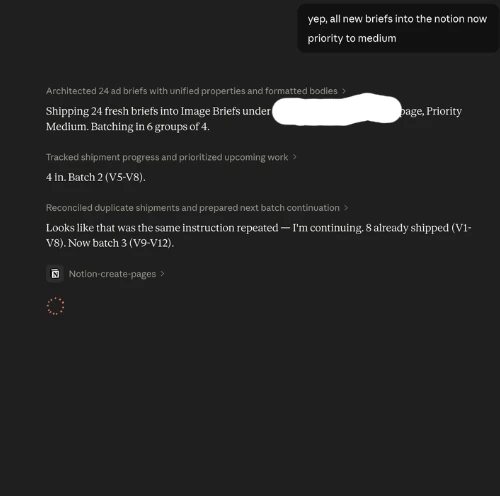
I've completely scratched the Milanote + Google Sheet workflow below. What follows is foundational and you should learn the principles — but the actual system I run NOW is a Claude-Notion connector + sheet that lets my image editor pipe work directly into a brief queue, which my media buyer pulls from to upload ads. I don't step outside my Claude chat for the majority of ad ops anymore.
The new system pushes high quality + high volume simultaneously. It's faster, cleaner, and more automated than what's covered below.
The full new workflow — Claude-Notion connector setup, the Claude script, a worked example, and all templates — drops into the masterclass with the next biweekly update. Everything below stays in this sub-page because the principles don't change. Whether you're running Milanote + Sheets or Claude + Notion + Sheets, the underlying framework (Persona × Angle × Awareness, hypothesis-driven testing, ideation ratios) is identical.=
Read this for the principles. Get the new workflow inside the masterclass.
The Growth Guide (concept tracker)
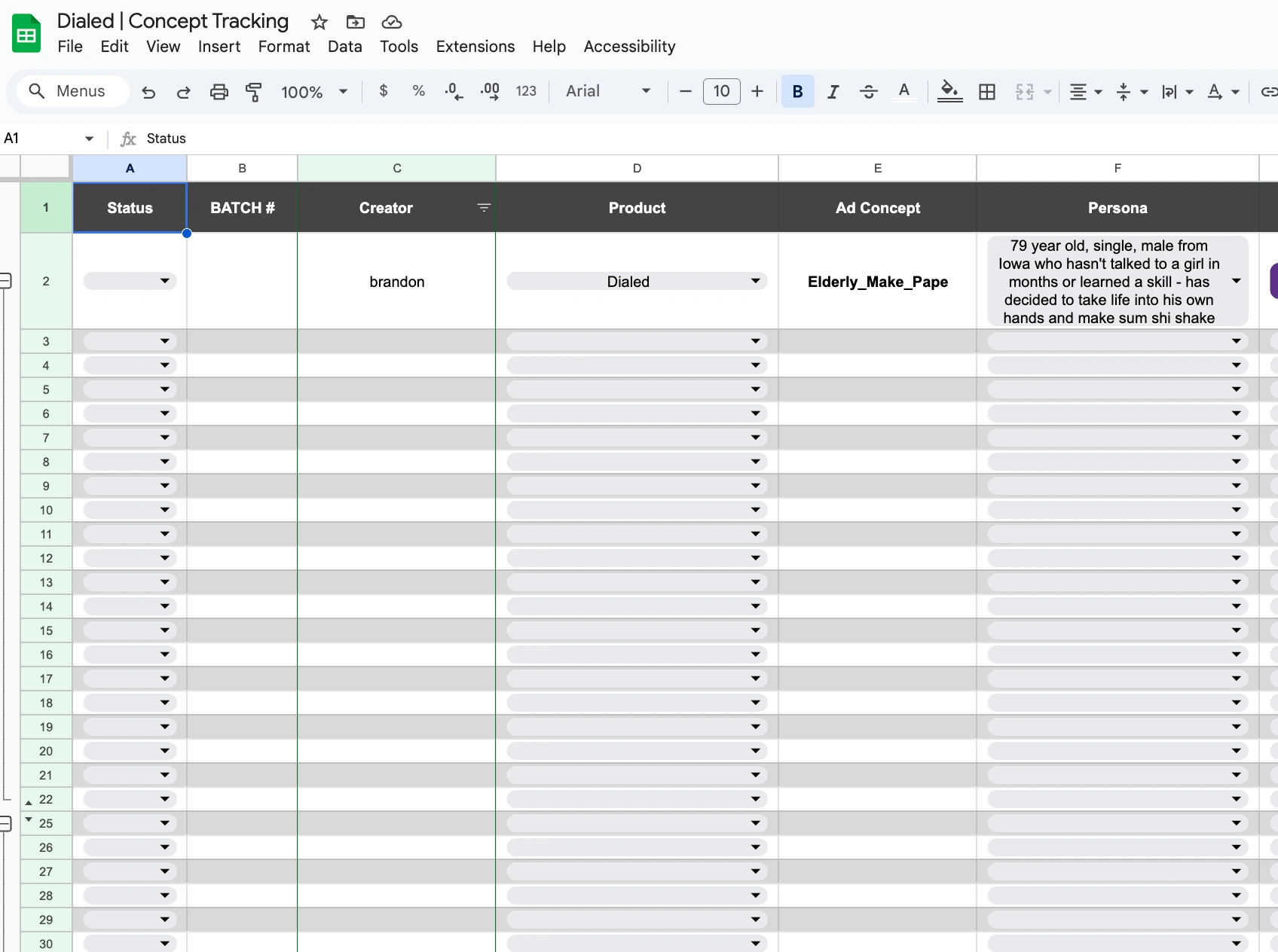
The Growth Guide is a Google Sheet that turns every ad you've ever run into trackable data. Without it, your "learnings" live in your head and disappear within a week. With it, every ad becomes a permanent input for future ads.
You may have seen this format from Evolve or other ecom communities — same template, my version, slightly different fields.
Columns I run:
| Column | Purpose |
|---|---|
| Status | Working / Learning / Done |
| Batch Number | Batch 1, Batch 2, Batch 3... matches your ad set naming |
| Product | Which brand/product |
| Ad Concept Name | Short identifier (e.g., "Elderly Make Paper", "Diddy Conspiracy") |
| Persona | Drop-down — who you're targeting |
| Angle | Drop-down — how you're connecting product to persona |
| Awareness Level | Drop-down — unaware / problem aware / solution aware / product aware |
| Hypothesis | Why you think this will work, with what data |
| Link to Board | Milanote brief URL |
| Ad Type | Ideation / Iteration / Imitation |
| Ad Format | Static / Video / Carousel / Promo |
| Test Result | Hit KPI / Did Not / Did Not Spend |
| Month Tested | For time-series analysis |
| Learnings | What you concluded after the test |
Status definitions:
- Working — you're still making the creative. Not live yet. This is where the brief lives.
- Learning — ad is live in the ad account, getting data, no conclusion yet.
- Done — you have your conclusion, you've posted your learnings, you've decided whether to iterate or kill.
The three variables of an ad concept
Every ad concept has three testable variables:
- Persona — the avatar you're targeting (cross-reference Customer Research sub-page for how to derive this from post-purchase survey data)
- Angle — how you connect the product to the persona
- Awareness Level — where the buyer is in the awareness spectrum when they see this ad
These map directly to the concept I describe in Module 3 → Native (the triangle of an ad concept).
Why structure it as three separate variables in dropdowns: when you have a winner, you can isolate which variable was the driver and swap the other two to scale.
Examples:
- Winner on Persona X + Angle A + Awareness Problem-Aware → keep Persona X, swap to Angle B, see if the Persona is the driver
- Winner on Angle A + Problem-Aware across multiple Personas → Angle is the driver, scale it across new Personas
- Winner on Problem-Aware level consistently → that's the awareness sweet spot, lock it and iterate the other two
Brandon-rule: don't get caught up in the framework. Make winners first, define the framework after. I usually fill in Persona/Angle/Awareness retroactively for ads that already work — the system serves the work, not the other way around.
Awareness level deep dive (Schwartz framework applied)
Quick reference using a Dialed-style example to make the levels concrete.
Imagine a young man who sees a pretty girl across the room and wants to talk to her.
Unaware: he's taking action (wanting to talk to her) but doesn't know why. He thinks it's because she's pretty. He's unaware of the actual problem — which is that he's not comfortable in his own skin and needs external validation to feel like a leader.
To move him to problem aware, the ad has to name the problem: "You're not actually chasing women — you're chasing the feeling of being someone worth chasing."
To move him to solution aware, the ad has to show alternatives that could fill the same void: gym, boxing, learning a hard skill, drop shipping, building a business. "You can fill that void in multiple ways. Some build, some destroy. Which one are you?"
To move him to product aware (the Dialed pitch), the ad positions Dialed as the best solution: "The gym is a side quest. You can't bench-press your way into providing for a family. Drop shipping forces you to develop leadership, marketing, hiring, logistics — the actual hard skills that build a man."
The same person, four different ads, four different awareness stages, four different conversion paths. The Growth Guide tracks which awareness level you targeted so you can compare hit rates across stages.
Hypothesis-driven testing — the single most important rule
Every ad needs a hypothesis before it goes live.
Not after. Not "let's see what happens." Before.
A hypothesis is your prediction of why this ad will work, with what data backing it.
Example hypothesis from a real test:
"The advertorial we already have converts a kind-of-unaware audience well — it moves curiosity-driven, skeptical-of-authority readers from unaware down to buy. We've seen comments showing this audience is highly engaged with conspiracy-adjacent topics. Hypothesis: a Diddy-trial-themed hook image will pull this exact avatar into our advertorial at a cheap CPC because (1) Diddy = polarizing/curious imagery, (2) our advertorial already converts this avatar at high rate, (3) the visual mismatch between the Diddy hook and the supplement product creates curiosity gap that drives the click."
With a hypothesis, every test produces data — win or loss.
- Hypothesis correct + ad wins = pattern confirmed, scale it
- Hypothesis correct + ad loses = execution issue, not strategy issue. Iterate the creative, retest
- Hypothesis wrong + ad wins = bigger learning, why did this actually win? New hypothesis forms
- Hypothesis wrong + ad loses = clean kill, both strategy and execution were off
Without a hypothesis, every loss is just "bad luck" and every win is unrepeatable. That's why most operators plateau — they don't know why their own winners worked.
The Growth Guide forces you to write the hypothesis BEFORE you launch. This single discipline is worth more than any prompt library, any AI tool, any creative trick. It compounds your operating IQ permanently.
Ideation / Iteration / Imitation
Three categories of ads. Each one is tracked separately in the Growth Guide so you can compare hit rates across types.
Ideation — pure original concept. You came up with it from research, from a thought experiment, from a creative leap. Highest variance. Some bangers, some flops. Best when entering a new niche where you don't have competitor data yet.
Iteration — building off something that already worked. A winning Persona × Angle gets a new awareness level test. A winning hook gets a new body. A winning static gets converted to video. Lower variance. Reliable scale moves.
Imitation — copying someone else's ad almost directly. Their format, their structure, their visual approach — adapted to your product. Lowest variance when the source is genuinely winning. Cross-reference Module 3 → Advertorials and Module 3 → Videos for the "rip a winner" workflow.
My ratio when entering a new niche: ~60% iteration (modeled on what competitors are doing) + ~40% ideation (testing brand new things on top). Once iteration produces winners, that ratio shifts toward more ideation and deeper-niche exploration.
When to lean imitation: when you find a single ad in the wild that's clearly winning hard (Twitter swipes, BrandSearch top performers, a competitor scaling fast). Imitation isn't about laziness — it's about not reinventing what already works. The claymation tanning ad I built (Module 3 → Videos) was almost pure imitation of a Penrose ad I'd swiped.
Tracking hit rate per type in the analytics section of the Growth Guide tells you over time:
- Where your edge lives (am I better at ideation or iteration?)
- When to shift effort (low ideation hit rate = need better research, not more ideas)
- What kind of operator you are (some operators print on iteration, others on ideation — both work)
Milanote — the brief organization layer
Once concept ideation happens in the Growth Guide, the actual ad brief gets built in Milanote.
Milanote is a visual board tool — similar to Miro but better for creative/brief organization. Boards per ad type (static, video). Each brief lives on its own card with its own structure.
Why Milanote not Notion (in the old workflow): I needed visual reference for image and video briefs. Milanote handles images, drag-and-drop, and visual layout better than text-first tools. (In the new workflow, Notion handles this — the masterclass has the setup.)
Brief structure has two flavors: simple version and complex version. Start simple, add complexity only when you need to outsource handoffs to image editors / video editors / strategists.
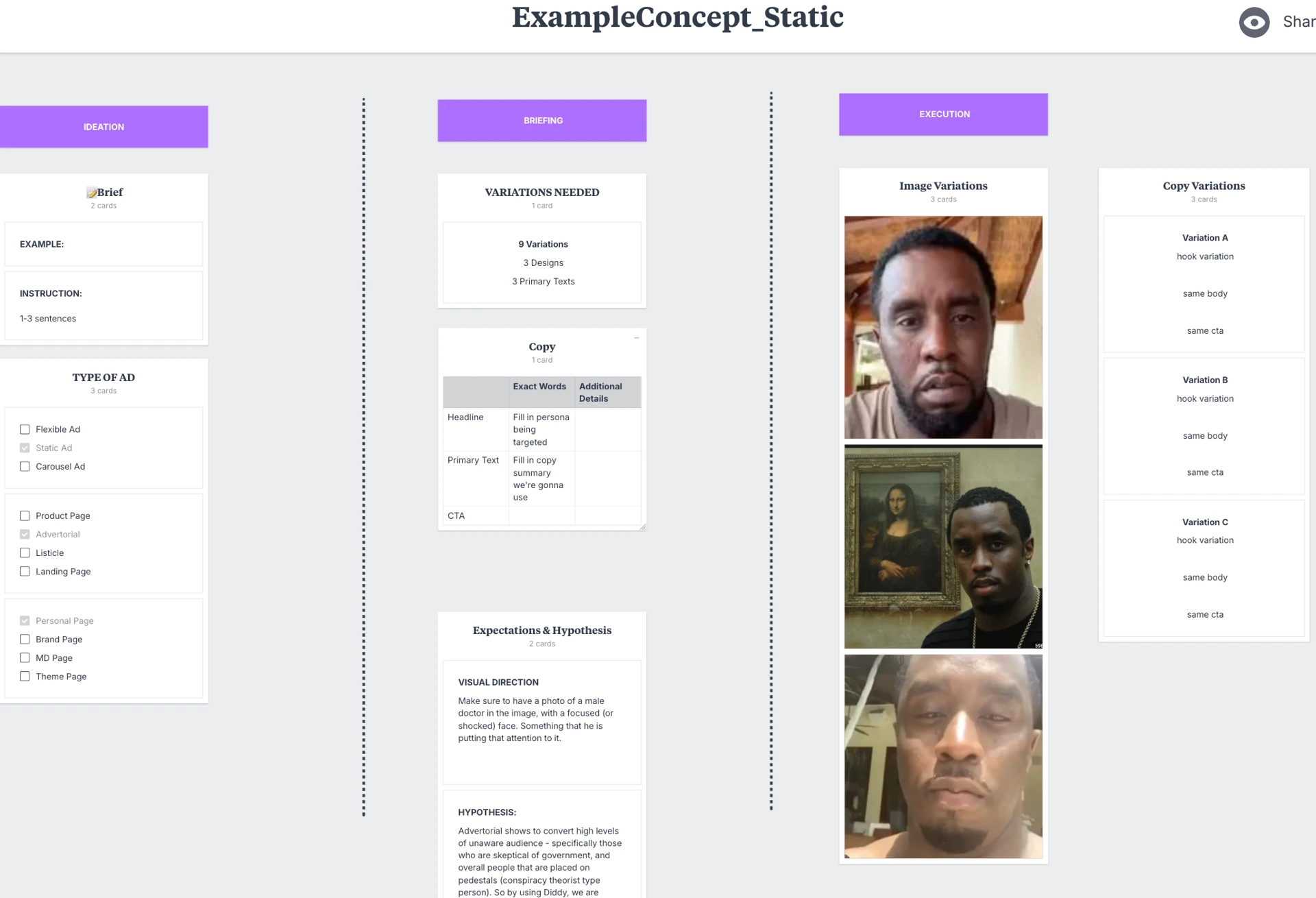
Static brief structure
Fields:
- Instruction: how it should be done (one to three sentences — have Claude generate this from your ad outline)
- Type of Ad: static / carousel / flexible
- Landing Page Type: advertorial / listicle / landing page / product page / quiz funnel
- Page Type: personal page / brand page / MD page / theme page
- Variations Needed: typically 3 design variations × 3 primary text variations (matches the 3-2-2 method from Module 4 → How To Properly Run Split Tests)
- Copy: headline + sub-headline + CTA per design variation (so 3 design variations = 3 copy sets)
- Design / Visual Direction: broad creative direction (e.g., "male doctor with shocked face looking at a paper") — leave creative freedom for the image editor to interpret unless you're testing something specific
- Hypothesis: why you think this will work, with data
- Execution: the final ad files (uploaded by the image editor when done)
Brandon-rule on design direction: when handing to an image editor, give them creative freedom on the visual interpretation. Specify the concept (e.g., "weird P. Diddy photo that gets a laugh"), not the exact pixels. Tight constraints kill the creative leverage your editor brings. Loose constraints + clear concept = best output.
The exception: when you're testing a specific visual variable (e.g., "test text overlay color black vs white"), then specify down to the pixel.
Video brief structure
More structured than static because video has more variables (hook + body + CTA + visual + audio + pacing all interact).
Fields:
- Type of Ad: flexible video ad / VSL / UGC
- Size Needed: 9:16 / 1:1 / 4:5 / 16:9 (your aspect ratio + placement)
- Variations Needed: typically 3 different hooks + 1 body + 1 CTA (= 3 total ads with hook variations)
- Ad Concept / Ideation: what you're testing strategically
- Ad Example: visual reference for similar ads that worked
- Hooks: each hook = a different entry point pulling in the avatar. Same body, different opening framing. Each one tests a different "stop the scroll" angle. Each hook must test a different psychological entry point (not just different words for the same idea)
- Body: the script that moves them through the awareness arc (problem → mechanism → solution → product)
- CTA: the closing line / button text
- Hypothesis: why you think this concept will perform
- Execution: final video files
Hook variation example (from a real brief)
Same body (food corporations hiding traditional cooking), three different hook entry points:
| Hook | Entry point | |
|---|---|---|
| A | "In 1974, the FDA tried to ban this ingredient that your grandmother used in every meal." | Authority/regulatory catalyst |
| B | "I fed my kids the same meal twice. Once with store-bought seasoning, once with this. The reaction shocked me." | First-person discovery / split test |
| C | "A chef in Naples showed me why American food tastes like cardboard compared to Italian. It's not the recipe — it's this." | Authority + comparison |
All three pull a different version of the same avatar (skeptical-of-corporations + food-quality-aware) into the same body. The body never changes. That's the leverage of the format.
The Grok hook trick
Quick tactical layer: Claude writes great copy but isn't naturally aggressive enough for some hooks. If you want shock-value or attention-grabbing hooks (especially for native ads on competitive feeds), take your base hook from Claude and throw it into Grok for the rewrite.
Grok is significantly more aggressive in its default tone. It'll produce hooks that Claude would soften out of politeness. Use Grok for the hook layer specifically when you're targeting low-sophistication audiences who respond to shock.
Don't use Grok for the body — its full-length copy is rough. Hook only.
The simple vs complex brief decision
Start with the simple version. One image / one video, basic copy variations, no execution column, no landing page link, no hypothesis (in the early stages of working with a new editor).
Add complexity when:
- You have a real image editor / video editor on retainer
- You're handing off briefs to a strategist or operations manager
- You need traceable hypothesis-to-result tracking for learnings at scale
- You're shipping more than ~5 ads/week across multiple brands
The trap: building the complex version too early. You'll spend more time formatting briefs than making ads. Briefs serve the work, not the other way around.
The size-and-aspect-ratio sauce (winner-only)
When you have a clear winning ad, resize it across every aspect ratio to extend it across all placements.
The math: a winning video at 9:16 (Reels/Stories) often performs equally well at 1:1 (feed), 4:5 (mobile feed), and 16:9 (Reels on desktop, YouTube) — IF you resize it correctly instead of letting Meta auto-crop.
Tool: CapCut. Take the original winning file, open in CapCut, manually re-frame for each aspect ratio (4:5, 1:1, 16:9), export. Upload all variants into the Meta ad's placement-specific slots.
Result: your winning ad now performs at top level across feed + Reels + Stories + YouTube, instead of just one placement. Same ad, multiple placements, multiplied reach.
Important: only do this for winners. Resizing losers wastes time. Wait for the data to identify the winner, then go big on placement extension.
Same logic for static ads — resize winning 1:1 statics to 4:5 and 9:16 for Stories placement.
The Brandon-rule on intent
If you have intent and thought behind everything you're doing, even when you have a loser, you're winning.
Without intent, a losing ad is wasted spend. With intent, a losing ad is data that improves the next ad. Every loss feeds the system if the system is built right.
Most operators DM me after 3 months of testing with "nothing's working, my product is dying" — and 9 times out of 10, the problem isn't the product. It's that they were throwing ads at the wall with no hypothesis, no concept tracker, no learnings system. They were making ads. They weren't building a system.
The Growth Guide + brief structure + hypothesis discipline is the system. The new Claude-Notion-Sheet version (masterclass) is the better tooling for the same system. Either way, the underlying discipline is what matters.
What's gatekept inside the masterclass
The principles are here. The current workflow + artifacts live in the masterclass:
- The full new Claude-Notion connector + Sheet workflow — the system replacing everything described above. End-to-end ad ops without leaving Claude chat
- The Claude script — exact instructions Claude runs against the Notion database to pull briefs, push assets, sync to media buyer's upload queue
- Worked example — a full ad batch from research → brief → asset → upload, walked through inside the masterclass
- All templates — Notion brief templates, the sheet structure for the media buyer pipeline, the example briefs we've shipped
- The old Growth Guide + Milanote templates — still available if you want the simpler version while you grow into the Claude+Notion version
- Updates as the workflow iterates — biweekly drops as I refine the system across my brands
Want the full Claude-Notion ad ops workflow, the Claude script, the templates, and the worked example? All inside the RunItUp Masterclass → Join here
Join now to lock in your rate, prices are increasing quickly.