The image editor role is a volume role. That's the framing that matters. Most operators hire an image editor expecting them to do strategic creative direction — picking concepts, designing ads from scratch, "elevating the brand." That's not the role.
An image editor is a machine gun. They produce volume off briefs you give them. Not a sniper. Not a strategist. Not a creative director. A precision-volume operator who takes a brief, follows the visual direction, and produces clean variations fast.
This is one of the easier roles to hire well — there are a LOT of strong image editors globally, and the SOP is relatively simple to put together. The hard part is hiring at the right pay rate without losing them, and giving them the toolkit so they're not bottlenecked by software.
Why this hire matters — the machine gun vs sniper philosophy
Volume of creative is the leading indicator of brand growth on paid social. The brands at the top of your feed every day are running 100+ active ads at any given time. They're not running 5 perfect ads — they're running 100 mediocre ones that mathematically produce a few winners.
Image ads are the machine gun. They're cheap to produce, fast to iterate, easy to test. Use image ads to throw ideas at the wall and see what sticks.
Once an idea sticks (high CTR, decent CPA, strong engagement), THEN you bring in the snipers — video ads. Video ads cost more, take longer, and are higher leverage because they convert at higher rates. But video ads should only be made on concepts that have already proven themselves in image format.
This is the framework: machine gun (image ads) → sniper (video ads).
And the role of the image editor is to KEEP the machine gun firing. Constant volume. Daily. Multiple variations of every brief. Quick turnaround. No design ego. No "let me workshop this for 3 days." Just: brief in, files out, repeat.
Hiring the role
Where to find them:
- Upwork — my default, and where I've hired most of mine. Throw up a job post titled "Image Editor — DTC Brand," set the rate range, you'll get dozens of applicants in 24 hours.
- X (Twitter) — there are surprisingly strong image editors who pop up in DTC operator circles. Post directly, hashtag #imageeditor #graphicdesigner, people will reach out. If you have a personal brand, this is the cheapest hiring channel.
- LinkedIn — slower turnaround but decent if you want more vetted candidates. You can boost a post for $20–$30 to amplify reach.
- Onlinejobs.ph — Philippines-based talent, lower rates, more vetting needed.
The geographic sweet spots:
- Brazil — sleeper goldmine. Brazilian image editors are fucking cracked. Strong design culture, fluent enough English for SOPs, significantly cheaper than the US or Western Europe. I've found my best image editors here. Most operators don't think to look here.
- Eastern Europe — Poland, Ukraine, Romania, Bulgaria — strong design traditions, reasonable rates, English proficient.
- Philippines — large pool, low rates, you'll need to vet harder for design taste.
What to look for:
- Portfolio that includes DTC ad work — not "I designed a logo for my friend's restaurant." You want someone who's made ads for ecom brands. Different skill set than general graphic design.
- Speed. Volume is the role. Ask in the trial: "How many ad variations can you ship in a 6-hour shift?" If they say less than 10, they're not the right hire.
- Comfort with reference-based work. They should be able to take a winning ad you provide and produce variations in that style. Don't hire someone who only wants to "do their own thing."
- English proficiency for written briefs. They need to be able to read a Notion brief and execute. Verbal English isn't required (they're not on calls). Written English is.
The paid trial that filters:
Send them an actual brief from one of your real ads — a real one, with all the LP Type, Persona, Angle, Awareness Stage, Format Ratio fields populated. Pay them their hourly rate for 4–6 hours. Have them produce 3 variations.
Check:
- Did they read the brief carefully? (Did they match LP Type? Match Persona? Match Awareness Stage rules?)
- Did they follow the format ratio specified?
- Did they put the right text on the image and skip the text that goes in Meta?
- Did they produce 3 distinct variations or 3 copies of the same image?
- How long did it take them?
A good image editor produces clean, on-brief variations in 4–6 hours. A great one is faster than that. A bad one ignores half the brief and gives you "creative interpretation."
When to hire:
If you're producing more than 5 image ads/week yourself, hire. Cost is roughly $5–$15/hr depending on geography and experience. The math always works.
The toolkit — give them the right tools or they'll bottleneck
The biggest leverage you can give an image editor isn't paying them more — it's giving them better tools.
Claude API + image generation skill. This is what I use for high-volume image production. The Claude API connects to image generation models and lets the editor produce dozens of variations from a single prompt in minutes. The cost: pennies per day of API charges. I've produced hundreds of images for essentially free — the API keeps barely registering charges.
Nano Banana (Google AI Studio's Gemini image model) — most editors will gravitate to this if you don't give them an alternative. Good quality, native to Google AI Studio.
Higgs Field — another option editors will ask for. Decent quality, more expensive on a per-image basis.
If you don't give them the Claude API skill, they'll default to Nano Banana or Higgs Field. Both work — but the Claude API approach is faster, cheaper, and produces higher volume per hour. Give them the API key, set the skill up for them, and watch their output multiply.
This is the difference between an image editor producing 10 variations per shift and one producing 50.
The SOP at a glance
The SOP I use for image editors is a structured document. The full version — including the specific aesthetic guides per Facebook Page, the full awareness stage rules, the format ratio safe zones, and the exact pre-submit checklist — lives inside the masterclass.
The structure of the SOP:
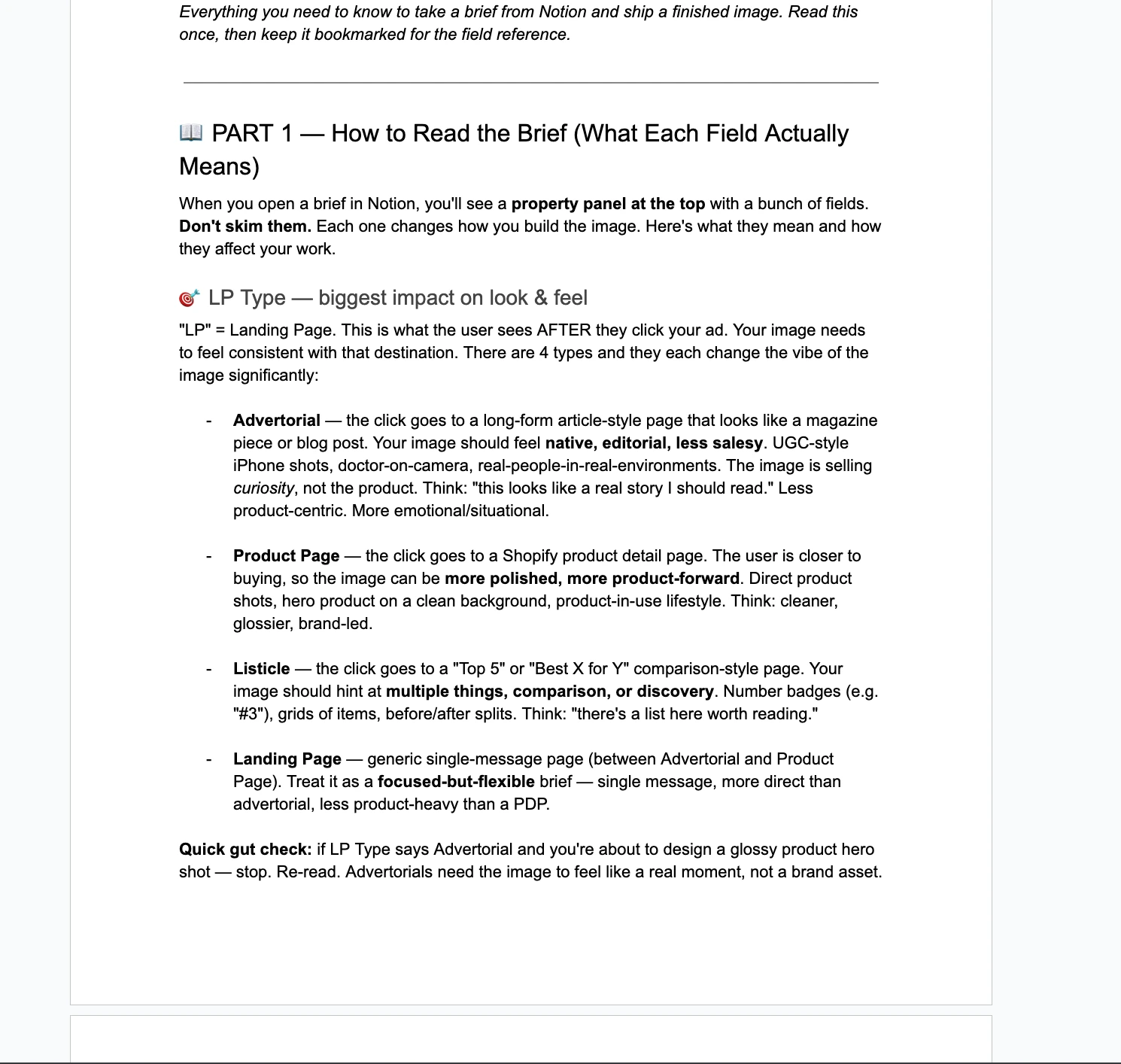
Part 1 — How to Read the Brief
The image editor's primary skill is reading the brief carefully. Every brief has property fields at the top of the Notion page that tell the editor exactly what they're building. The SOP teaches them what each field means and how it changes the visual approach.
The fields covered:
- LP Type — Advertorial, Product Page, Listicle, Landing Page. Each demands a totally different visual feel. Advertorials need native/editorial vibe. PDPs need polished/product-forward. Listicles need comparison cues. Mismatching this is the #1 reason ads underperform.
- Facebook Page — which brand persona/voice the ad runs from. Different pages have different aesthetics.
- Persona — not "demographic." Real human description. The editor should picture this specific person scrolling.
- Angle — the strategic hook. The image must support the angle, not just look pretty.
- Awareness Stage — Unaware → Problem Aware → Solution Aware → Product Aware → Most Aware. Determines how direct the image can be about the product.
- Headline / Subheadline / On-image text — exact wording, no paraphrasing.
- Variant (Control vs Test) — control = replicate the formula. Test = change ONE specific variable, leave the rest alone.
- Format Ratio — 1:1, 4:5, 9:16, Carousel.
Part 2 — Workflow
The exact step-by-step:
- Get brief link from strategist
- Read brief fully BEFORE starting (no skimming)
- Change Status to "In Production" in Notion
- Build the image variations
- Upload finished files to a Google Drive folder named after the concept
- Paste the Drive link into the Asset Folder URL field in the brief
- Drag the finished files into the Asset Drop Zone section of the brief itself
- Change Status to "Asset Delivered"
Done. Strategist gets notified, reviews, either approves or sends revisions.
Part 3 — Revisions
If the strategist sends notes, the editor reads them, updates files, replaces the old files in Drive (doesn't add new ones), drags new versions into the Asset Drop Zone, leaves status as "Asset Delivered" for re-review.
Part 4 — Pre-Submit Checklist
A literal checklist the editor runs through before changing status. Files in Drive? Files in Asset Drop Zone? All variations included? Format ratio correct? On-image text matches brief exactly? Visual matches LP Type? Aesthetic matches Page persona? Image supports the Angle? Status updated?
Skipping the checklist is what causes 90% of revision rounds. The SOP makes it impossible to forget.
Part 5 — What You DON'T Worry About
A specific section that tells the editor what's NOT their job: filling in property panels, the Google Sheet, writing copy, choosing audiences, campaign decisions, the Apps Script automation. The role's only job: brief → build → upload → status update. The SOP makes the boundary brutally clear.
How this integrates with the media buyer pipeline
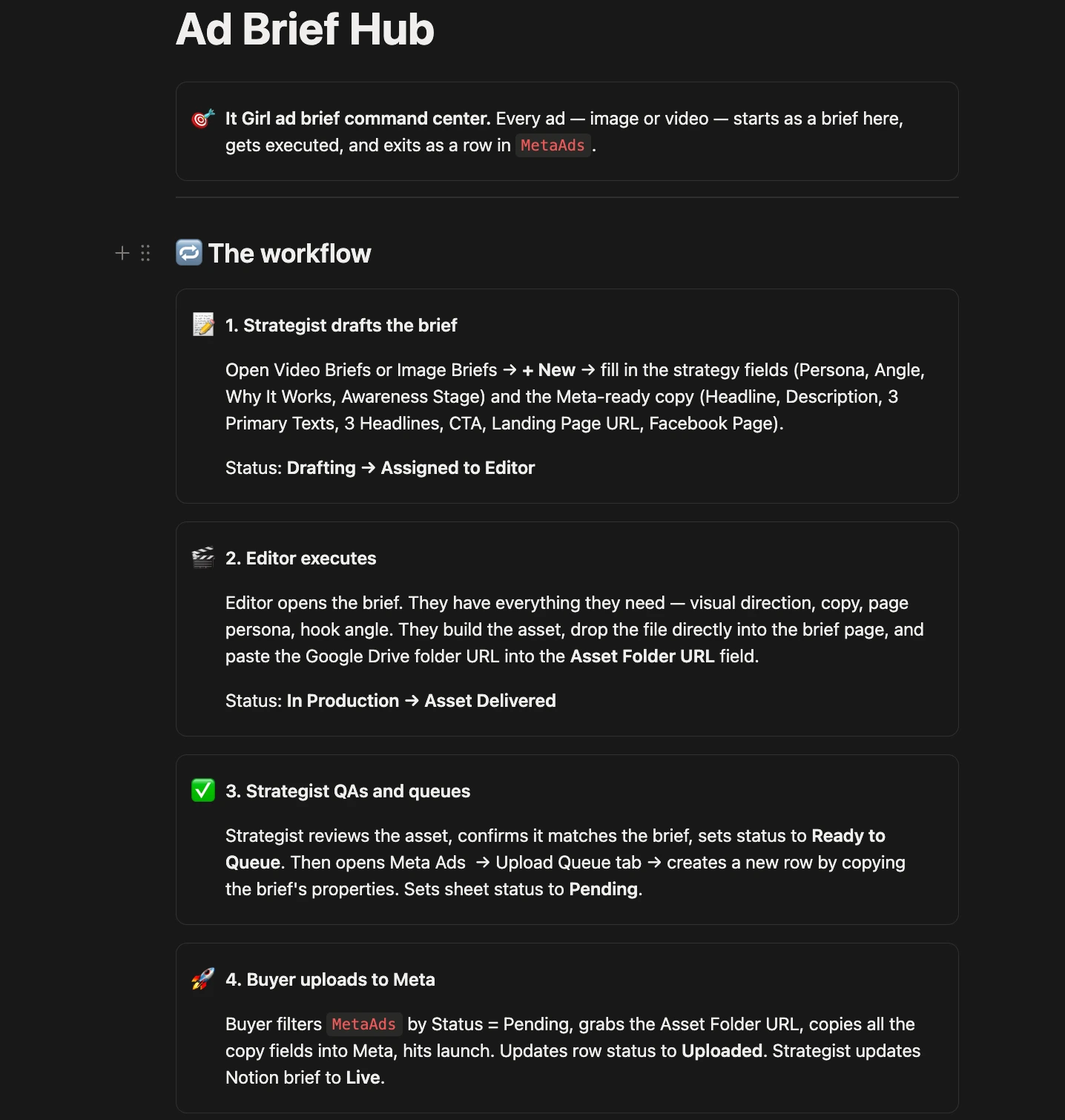
This is where the image editor role becomes high-leverage. The image editor isn't producing files into a void — they're a node in the integrated pipeline I covered in the Media Buyer sub-page.
The full flow:
- I create the brief in Claude.
- Claude pushes the brief to my Notion brief dashboard.
- Image editor opens the brief, reads it, changes status to "In Production," produces files.
- Image editor uploads finished files to Google Drive, pastes the link into the Asset Folder URL field, drags files into the Asset Drop Zone, changes status to "Asset Delivered."
- Strategist (or auto-script) reviews, marks the brief Approved.
- Google Apps Script polls the Notion queue and auto-populates the media buyer's Master Tracker with the brief details + the Google Drive link.
- Media buyer uploads to Ads Manager.
The image editor is the production node. They get briefs in, they put files out. The SOP is what makes this consistent — every editor reads the same instructions, follows the same workflow, produces in the same format.
Giving them view-only access to the ad account
Counter-intuitive move that pays off: give your image editor view-only access to the Meta Ads Manager.
The upside:
- They see what's actually running and what's working.
- They learn faster — when they see THEIR ads spending and converting, they internalize what good looks like.
- It keeps you honest on bonuses. If you said "I'll give you a bonus when sales hit X," they can see when it hits X. Helps you actually pay them.
- Their ego gets fed in a productive way — they're invested in the brand's success because they can see it.
The downside:
- They can see your spend and revenue without understanding the back-end (cost of goods, OPEX, ad costs, etc.).
- If they're not financially literate about DTC margins, they might think "they made $10k off my ads and only paid me $300, that's unfair" — even though the actual profit margin might be 5–10%.
- This only becomes a problem if (a) you're underpaying them, OR (b) they're a dickhead. Pay correctly + hire well, and the upside is way bigger than the downside.
I give all my creative production team (image editors, video editors) view-only ad account access. Net positive every time.
The training side — courses, swipe files, reviews
Most of my actual time with image editors goes into training, not directing. The SOP handles direction. Training is what makes them better over time.
What this looks like:
- Courses — internal training on what good DTC ads look like, why certain elements work, what the awareness ladder means visually
- Swipe files — collections of winning ads (mine, competitors, brands at the top of my feed) organized by angle, format, page type, awareness stage
- Review feedback — when they submit work that's off-brief, I give specific feedback so they don't make the same mistake again
This training compounds. An image editor in their first month is producing maybe 20 variations/week with mediocre quality. By month 3, they're producing 50+ variations/week with most of them on-brief and ready to ship. The training is what gets them there.
The course materials and swipe files are gatekept inside the masterclass.
Why this SOP is gatekept
The full image editor SOP — including the specific aesthetic guides per Facebook Page persona, the full awareness stage decoder, the format ratio safe zones, the angle-to-visual matrix, and the swipe files — lives inside the RunItUp Masterclass.
The SOP took a year of iteration across multiple brands to get right. Every aesthetic guide is the result of testing what works against what doesn't. The awareness stage rules are the difference between an ad converting and an ad burning money on cold audiences.
The SOP also stays current. My image editor SOP isn't what it was 6 months ago — every time we hire a new editor, I learn what they get confused by and update the SOP so the next hire doesn't hit the same gap. The masterclass version stays live.
Want the full SOP, the swipe files, the brief template, and the full Notion + Claude integration? All inside the RunItUp Masterclass → Join here
Join now to lock in your rate, prices are increasing quickly.