The media buyer role is the most misunderstood hire in DTC. Most operators think "media buyer" means someone who does the strategy — the targeting, the budgets, the creative selection, the scaling decisions. That's not the role I hire for.
My media buyer is an ad uploader. They take ads I (or my creative strategist) make, paste them into Ads Manager, double-check everything, and follow the SOP. They don't make strategy decisions. They don't freestyle. They don't touch live campaigns. They follow the system exactly, and that's the entire value of the role.
I handle the scaling, the descaling, the cutting, the bid changes. Eventually I'll systemize that piece too and have the VA handle scaling — but that's the next iteration. For now: I make ads + run scaling. The media buyer uploads them.
Hiring this role correctly removes the single most fatiguing daily task in DTC: uploading ads inside the buggy hellscape that is Meta Ads Manager. It finally lets you get out of the daily Meta bug rage. And once it's running properly, you don't have to open Ads Manager more than once a week.
This sub-page covers: who to hire, the SOP that runs the role, and — most importantly — the integrated Claude + Notion + Google Apps Script pipeline that lets the entire ad uploading process happen with almost zero of my involvement.
Why this hire matters
If you're scaling a brand, you're making a lot of ads. UGC creators are submitting content. Your image editor is pumping out static variations. Your video editor is splicing B-roll. Your creative strategist is briefing concepts.
All of that creative output has to get into Meta Ads Manager. And Meta Ads Manager:
- Is buggy as fuck on any given day
- Loses ad sets randomly
- Reverts settings without warning
- Throws errors that mean nothing
- Slows to a crawl when you're trying to upload 20 ads at once
If you're doing this yourself, you're spending 1-2 hours/day in Ads Manager just uploading. That's 1-2 hours you're not spending making more ads. Or scaling. Or any high-revenue task. The compression on your time and brain is significant.
The media buyer is the role that makes this disappear.
Hiring the role
Where to find them:
- Upwork — large pool, fast turnaround. Most DTC media buyers list themselves here.
- Onlinejobs.ph — significantly cheaper rates, more vetting needed
- Agencies — there are agencies that place ad uploaders, more expensive but pre-vetted
- Your network / LinkedIn — slower, but quality is often higher
What to look for:
- Detail orientation. This is the #1 thing. Mistakes in Ads Manager cost money. They cannot make small errors.
- Robot mode. This person should not have ego about doing strategy. They should LIKE following SOPs and executing flawlessly. Ego is the killer in this role.
- Experience with Meta Ads Manager specifically. Not just "marketing experience" — direct hands-on with the platform.
- Comfort with structured workflows. They need to work from a sheet, not from creative direction.
The paid trial that filters in 90% of the time:
Give them a small batch — 3-5 ads — and have them upload using your SOP. Check:
- Did they follow the naming convention exactly?
- Did they leave any Advantage+ Creative toggles ON?
- Did they edit any live campaigns?
- Did they ask questions when unclear or did they guess?
A bad media buyer will guess. A great one will stop and ask. Hire the asker every time.
When to hire:
If you're spending 30+ minutes/day in Ads Manager just uploading, you're past the point of needing this hire. Cost is roughly $5–$7/hr depending on experience. The math always works.
The SOP that runs the role
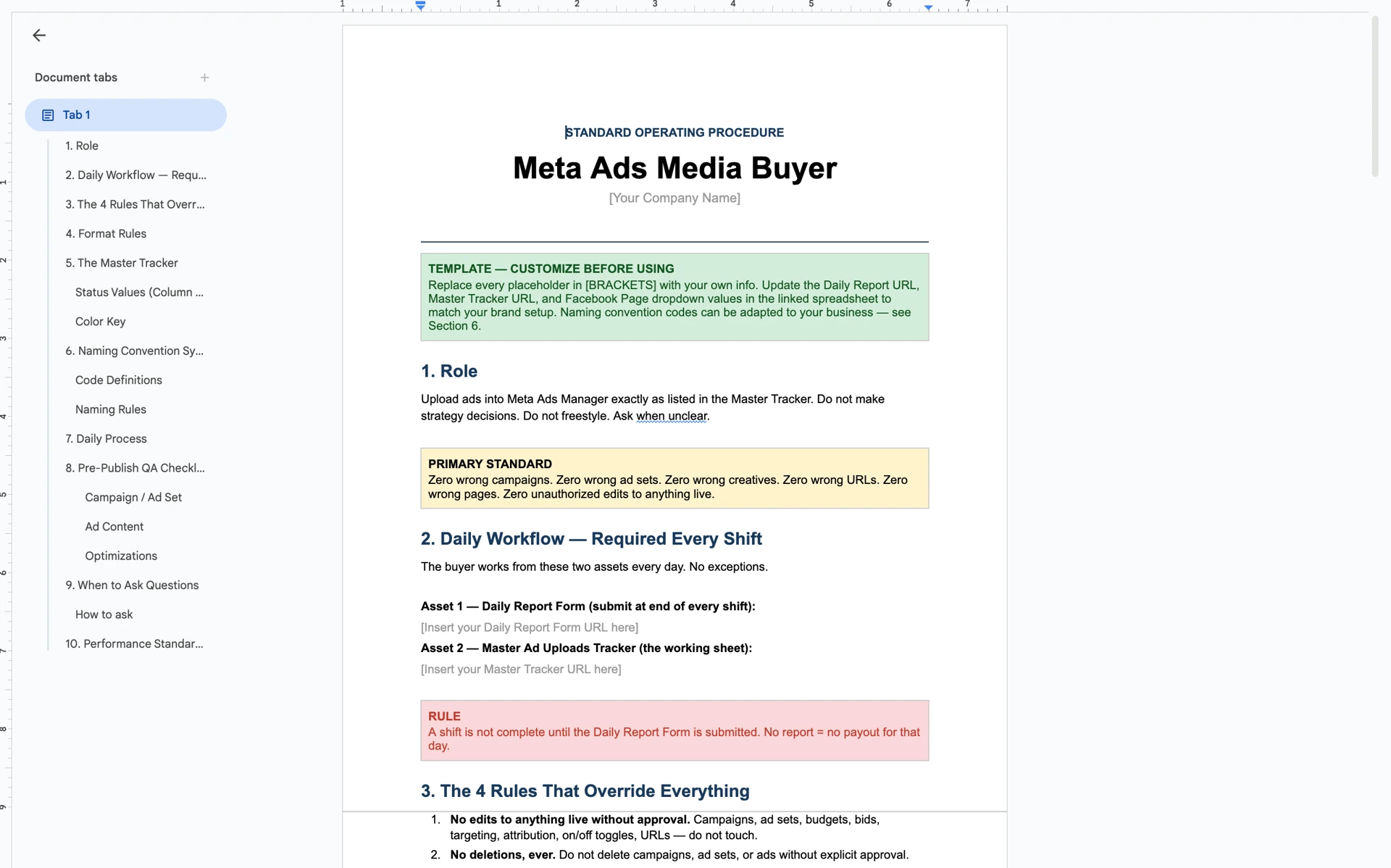
The role is governed by an SOP that's brutally specific. The full SOP is gatekept inside the masterclass — this is a preview of the structure.
The 4 rules that override everything else:
- No edits to anything live without approval. Campaigns, ad sets, budgets, bids, targeting, attribution, on/off toggles, URLs — do not touch.
- No deletions, ever. No campaigns, no ad sets, no ads — without explicit approval.
- All Advantage+ Creative Optimizations OFF on every ad. Image enhancements, text improvements, music, auto-variations, relevant comments — all OFF, every time.
- Ad names use the standardized naming convention. Auto-generated by the sheet. No manual naming. No edits to the formula. If a name looks wrong, the inputs are wrong — fix the inputs.
These four rules cover roughly 80% of what could go wrong in this role. The cost of breaking any one of them: instant fire. No second chances. The media buyer is told this on day one.
The mentality:
The SOP literally says: "Be a fucking robot. Do what you're needed and double check it all."
That's the entire mental model for the role. Not creative. Not strategic. Not initiative-taking. Robot mode. Follow the sheet, follow the SOP, ship the ads, fill out the form.
The Master Tracker — the sheet that runs the role
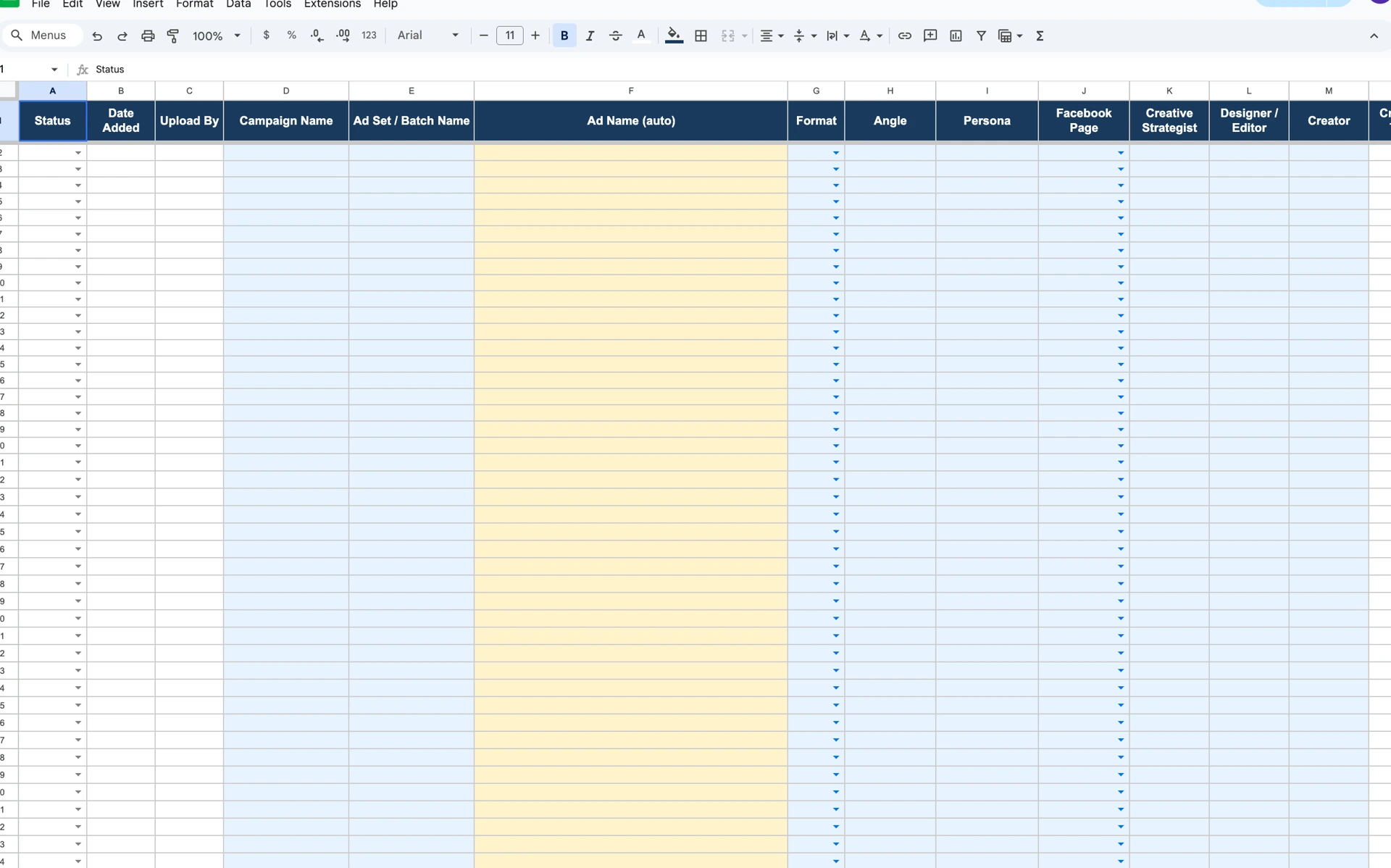
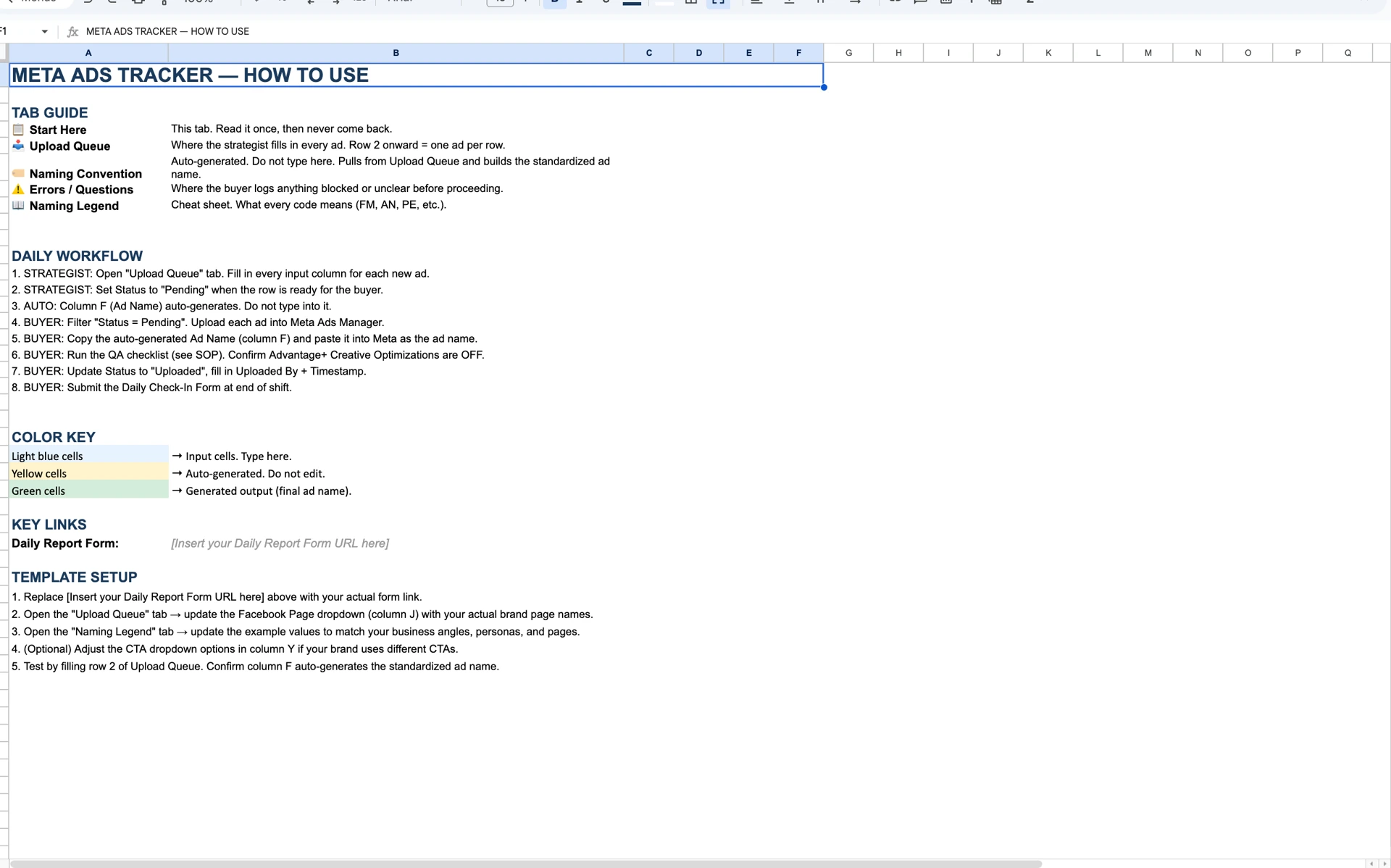
The whole role runs from a Google Sheet with 5 tabs:
| Tab | Purpose |
|---|---|
| 📋 Start Here | Onboarding tab. Read once. Daily workflow + color key + form link. |
| 📥 Upload Queue | Where the strategist (or auto-script) fills in every ad. Row 2 onward = one ad per row. Buyer's main working tab. |
| 🏷️ Naming Convention | Auto-generated. Pulls from Upload Queue and builds the standardized ad name. |
| ⚠️ Errors / Questions | Where the buyer logs anything blocked or unclear before proceeding. |
| 📖 Naming Legend | Cheat sheet — what every code means. |
The buyer's main job is to:
- Open the Upload Queue tab.
- Filter Status = Pending.
- For each row, upload the ad exactly as specified.
- Run the pre-publish QA checklist.
- Mark the row Uploaded.
- At end of shift, submit the Daily Report Form.
That's it. The whole role.
The naming convention (credit DTC Midas)
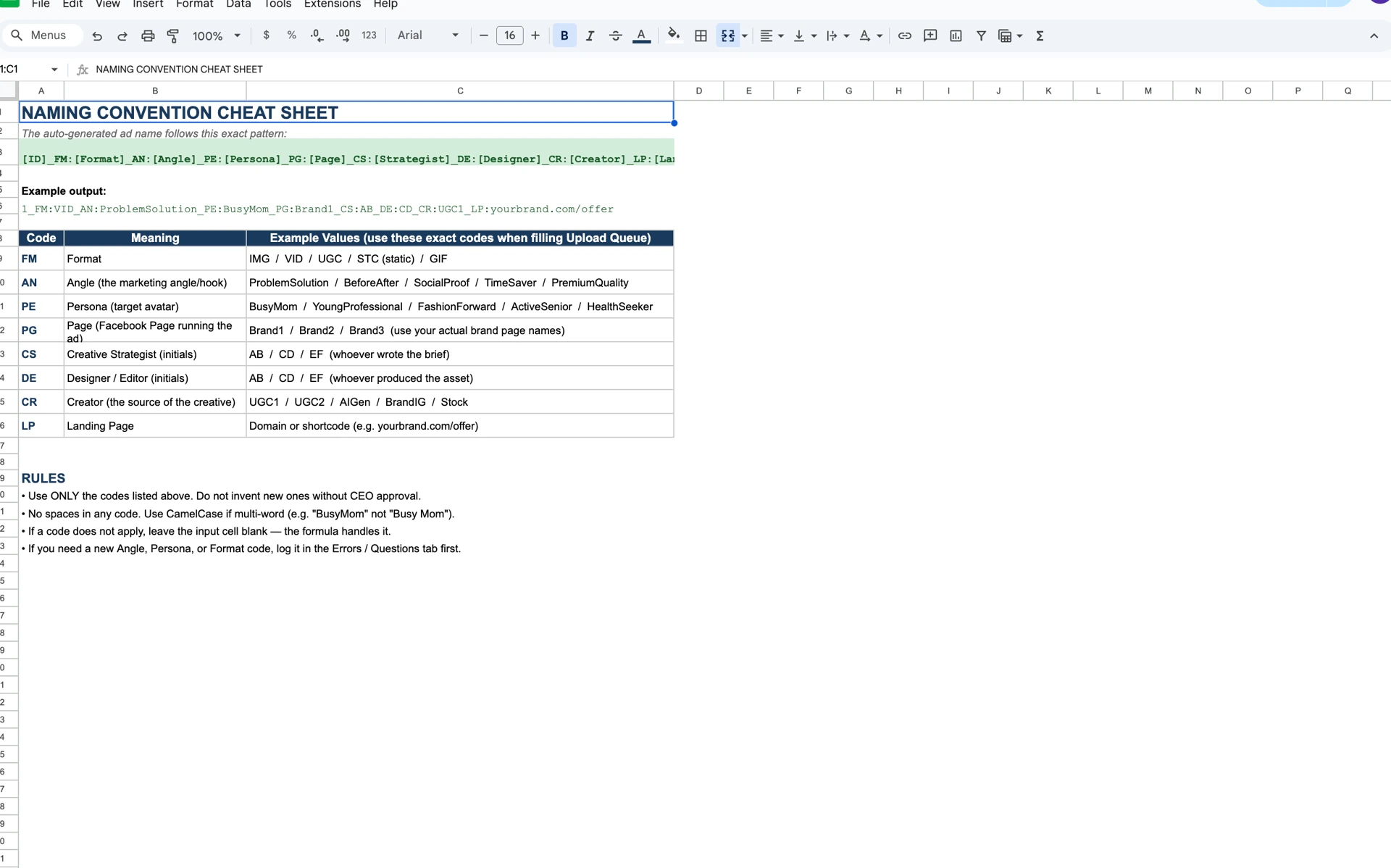
The naming convention is the secret sauce of the entire system. Without it, you can't read the data when you're scaling. With it, you can pull bulk exports and have AI summarize patterns across hundreds of ads instantly.
The pattern auto-generated by the sheet:
[ID]_FM:[Format]_AN:[Angle]_PE:[Persona]_PG:[Page]_CS:[Strategist]_DE:[Designer]_CR:[Creator]_LP:[LandingPage]Each code means something specific:
- FM = Format (image, video, UGC, static, GIF)
- AN = Angle (the marketing hook)
- PE = Persona (target avatar)
- PG = Page (which Facebook Page is the ad running from)
- CS = Creative Strategist (initials)
- DE = Designer / Editor (initials)
- CR = Creator (UGC source)
- LP = Landing Page (URL or shortcode)
When you have 100+ ads running, you can export the data, drop it into Claude or any other AI, and ask: "Across all my ads, which Persona codes are converting best? Which Angle codes are spending the most? Which combinations of FM + AN are winning?"
In 30 seconds, you have a pattern report. Bad naming conventions = dead data. Good naming conventions = an AI can do your media buying analysis for you.
The exact code library, the dropdown values, and the formula that auto-generates the names from input fields — all gatekept inside the masterclass.
The V2 integrated workflow — the actual current system
This is the system I'm running right now. It evolves the V1 sheet-and-SOP setup into something where I'm barely involved at all.
The pipeline:
Brandon (in Claude)
    ↓ creates brief
Claude skill
    ↓ sends to Notion
Notion brief dashboard
    ↓ image editor pulls from here
Image editor
    ↓ produces files, swaps to queue
Notion queue
    ↓ Google Apps Script pulls from here
Media buyer sheet (Master Tracker)
    ↓ media buyer uploads
Ads Manager
The system in plain English:
- I create the brief in Claude. I have a brief-creation skill set up. Drop in concept, avatar, product info → Claude generates a structured brief.
- Claude pushes the brief to my Notion brief dashboard automatically via the Claude + Notion connector.
- My image editor sees the new brief in Notion, produces the creative files, and swaps the brief into the queue when files are ready.
- A Google Apps Script polls the Notion queue and auto-populates rows in the media buyer's Master Tracker with all the brief details + creative file links.
- Media buyer opens the sheet, sees pending rows, uploads ads.
- Reports come to me only when I request them. I'm not in Ads Manager. I'm not in the sheet. I'm not pinging anyone for status.
The compounding effect is what matters. Compare V1 to V2:
V1 workflow:
- I make a brief in Notion manually.
- I tag the image editor in the Notion task.
- The image editor finishes, tags me back, I review.
- I copy the brief details into the media buyer sheet manually.
- I tag the media buyer in the sheet.
- The media buyer uploads.
- I check the upload, ask for status updates, etc.
My time per ad in V1: roughly 8–12 minutes.
V2 workflow:
- I create the brief in Claude (which I'd be doing anyway as part of writing copy).
- Everything else happens automatically.
My time per ad in V2: under 2 minutes.
At 30+ ads/week, that's a difference of about 4 hours of my time saved every week. Compounded across a year, that's 200+ hours back — the equivalent of 5 weeks of full-time work.
This is what the AI + automation layer is actually for.
The inflated bid cap strategy
One last specific tactical note. The way I scale ads with this system: inflated bid caps.
Instead of letting Meta auto-optimize spend (which is what most operators do), I set a high spend solid cap. The media buyer pushes volume — uploads everything I make — and the bid cap controls the spend. I don't worry about scaling individual ad sets or campaign budgets day-to-day. I worry about the cap, which I set strategically.
This is why my media buyer doesn't need to be a strategist. The bid cap IS the strategy. The volume comes from him. The result: high spend, controlled by cap, executed by uploads.
There's a lot more nuance to this strategy that I'll cover in Module 5 (How to Make Ads with Intent) and in the Direct Response module. At the high level, this is the simplification that makes the media buyer role an upload-only role.
Pre-Publish QA Checklist
Before any ad gets published, the media buyer runs a checklist. The full checklist is gatekept — but the categories:
- Campaign / Ad Set — correct campaign? correct ad set? no settings changed?
- Ad Content — name matches sheet? creative matches link? FB page matches? IG account matches? primary text matches? headline matches? URL matches? CTA matches?
- Optimizations — all Advantage+ Creative toggles OFF?
Any "no" or "unsure" answer halts the publish. The buyer logs it in the Errors / Questions tab and pings me.
Why this SOP is gatekept
The full Media Buyer SOP — every rule, every checklist item, every code in the naming convention, the exact Master Tracker template, the Google Apps Script that connects Notion to the sheet, the daily process step-by-step — lives inside the RunItUp Masterclass.
The reason: this entire system took years of iteration. The V1 sheet alone was tested and broken across multiple brands before becoming what it is now. The V2 Claude + Notion + Apps Script pipeline is what I'm actively iterating on right now and updating in real-time. The masterclass version stays current.
A media buyer who runs this SOP correctly executes flawlessly with zero errors. The cost of running this SOP wrong is significant — wrong campaigns get spent on, wrong ad sets get budget, momentum breaks, brand reputation in the algorithm degrades. Worth getting right.
Want the full SOP, the Master Tracker template, and the Apps Script that connects Notion to the sheet? All inside the RunItUp Masterclass → Join here
Join now to lock in your rate, prices are increasing quickly.