Most operators are paying email agencies $3-5k/month for what's effectively a flow builder with a few templates. The agencies are running through the same courses you can run through. They're charging you to set up the same 4-5 flows that print money. You can do all of it yourself in an afternoon with Klaviyo + Claude.
This sub-page is the entire email layer. Tools, the 4 flows that actually move revenue, the ripping workflow for designs, the founders letter + order delay sauce, and how to use the same imagen skill from Module 3 (Native) to ship campaigns as launch-ready PNGs straight into Klaviyo.
If you're spending $30k+/month on Meta and don't have these flows live, the email layer alone is a 20-30% revenue increase. That's the math.
Tool stack
For email: Klaviyo. Glorified flow builder, plays well with Shopify, the integrations work, the templates are real.
For SMS: Don't use Klaviyo. Their SMS pricing keeps creeping up and they're not the best at it. Better options:
- TextCart (txt cart) — what I run
- Postscript — popular, lots of operators on it, worth testing
If you're early-stage and can't justify Klaviyo's pricing yet: Shopify Flow is free. Works almost identically. Set up the same flows, save the money, upgrade to Klaviyo once you're scaling.
Klaviyo housekeeping move: clean your list regularly. Klaviyo charges by active contacts and they raise prices on you. Suppress inactive subscribers (no opens in 90 days) every quarter. Saves real money.
The 4 flows that actually print
You don't need 47 flows. You need these 4:
- Abandoned Cart / Checkout
- Welcome Series
- Customer Thank You (this is where the sauce lives)
- Exit Intent Popup
Plus campaigns every 2 weeks. That's the whole program. Anything more is overkill until you're at 7-fig scale.
How a Klaviyo flow actually works
Every flow has the same shape: trigger → wait time → conditional split → email/SMS.
For abandoned cart, the default Klaviyo flow looks like:
- Trigger: checkout started
- Wait: 4 hours
- Conditional split: is this person SMS-marketable? → if yes, branch to SMS. If no, branch to email.
- Email/SMS: send
If you're running email-only, delete the SMS conditional split. You don't need it. Just trigger → wait 4 hours → send abandoned cart email. Three components.
Same logic applies to every flow. Trigger fires, wait elapses, optional condition splits the path, message goes out. That's it.
Flow #1 — Abandoned Cart / Checkout
Setup: trigger = checkout started → wait 4 hours → email 1.
Email 1 (4 hours after trigger): 15% off. Reminder + soft urgency. Subject framing: "your glow is still in the cart" / "we held it for 24 hours" / "still thinking it over?"
Discount logic:
- Default first email: 15% off
- Why not 10%: rarely converts a buyer who already abandoned. They were already debating, you need real friction relief.
- Why not 20%+: kills margin. Save it for the urgency email.
- Exception: if your AOV is high enough that 15% is brutal margin-wise, scale down. The math has to work for your CPA.
Email 2 — final urgency (next day or so): 20% off. "40 hours left." This is the closer.
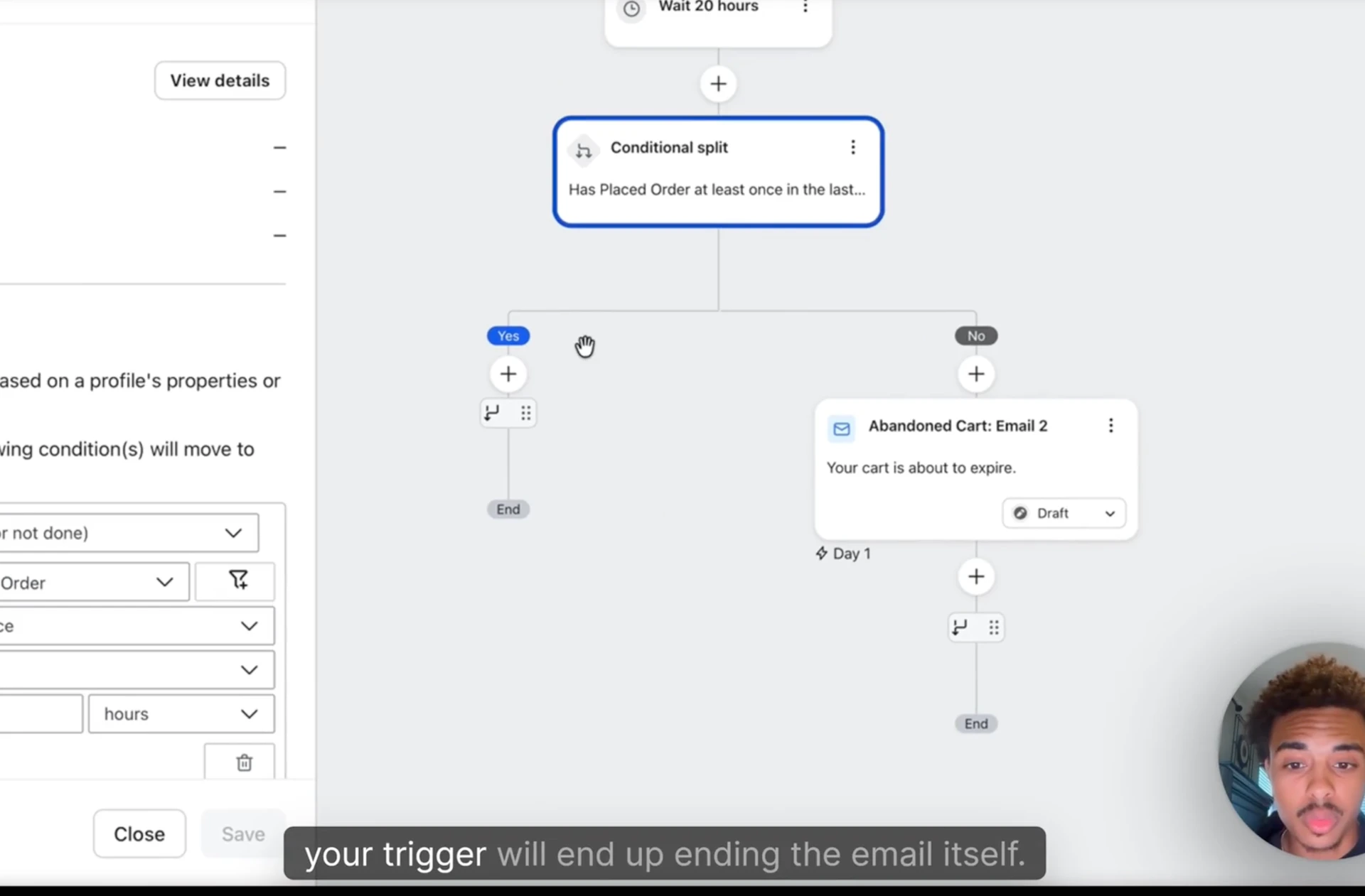
Conditional split for Email 2 — the trick most operators miss. Set up a trigger split on "person has placed an order in the last 24 hours." If yes → end the flow. If no → send the urgency email.
Why this matters: if someone abandoned cart, then came back the next morning and bought without using a discount, you don't want to send them the urgency 20% off email after the fact. They'll either ask for a retroactive discount (margin hit) or feel scammed (refund risk). The conditional split kills the email if they already bought.
The ripping workflow for email designs
You don't need to design emails from scratch. Rip what's already winning.
Source #1 — BrandSearch. Filter by brand, click into emails, see exactly what they're sending and the design. Best move: filter by abandoned cart specifically, look at 5-10 brands in your category, screenshot the strongest. Use code DIALED for 20% off → https://brandsearch.co?ref=runitup-course
Source #2 — go on the website yourself. Hit their popup with a fake email. Wait for the welcome flow. Open the email. Screenshot it. You're in.
Source #3 — subscribe to brands you respect. I'm in Grunz's SMS list right now and they text me every single day with a CTA. Won't be long-term sustainable for them — but tracking the cadence, watching when they drop off, seeing what wins is free intel.
The Claude rip move:
- Screenshot or download the source email design
- Drop it into Claude with this prompt structure:
"This is a really good abandoned cart email design. Let's replace the copy with our copy and insert our product image. Outline first in markdown — interactive artifact on the side. If approved, generate 3 variations using the imagen skill and our product reference file. Use the original as visual reference for layout, structure, and dimensions. Insert our product where the original has theirs."
- Claude returns the markdown outline first. Approve or tweak.
- Claude runs the imagen skill (covered in Module 3, Native sub-page — same setup, same skill, same Google AI Studio API key) and outputs 3 variation PNGs.
- Pick the winner, paste into Klaviyo as a single image.
Critical: make sure Claude generates the email as a PNG, not HTML. Klaviyo wants images. If Claude outputs HTML, tell it: "Generate as PNG, not HTML. The whole image needs to be one clickable file that goes into Klaviyo as an image block."
If Claude defaults to HTML, the image references inside won't render in Klaviyo. PNG is the format.
Flow #2 — Welcome Series
The critical move: conditional split immediately on whether the subscriber has already purchased.
Why this matters: if someone signs up via popup, then buys 30 minutes later, then receives your welcome email with "10% off your first order," they will reach out and ask for the discount applied retroactively. You either:
- Apply it and lose margin
- Refuse and piss them off (refund risk)
Conditional split solves this. Two paths from day one.
Path A — has not purchased yet:
- Email 1 (immediately): welcome + 10% off
- Email 2 (3 days later): reminder if no purchase
- Email 3 (7 days later): final reminder + soft urgency
- After 7 days, they sit in the list for campaigns
Path B — has already purchased:
- Email 1 (immediately): welcome + thank you, no discount
- Skip the reminder series, drop them into the customer thank you flow instead
Klaviyo has an AI flow builder that can stub this out for you. Use it as a starting point, then customize the conditional split logic yourself.
Flow #3 — Customer Thank You (the sauce)
This is the flow most operators don't run, and it's where the actual leverage lives. Sauce I got from CEO Micah a couple years ago. Two emails, both text-only, both written from the founder.
Email 1 — Founders Letter (1 day after purchase)
Subject line: "Message from the Founder, [Brand Name]"
Body: text-only, no images, no design, no logo. Just text. The structure:
Hey [first name],
I'm [name], the founder of [brand]. I just wanted to thank you personally for purchasing from us. We're a small business and every order genuinely matters to us.
[1-2 sentences on what the brand stands for / why you started it]
If you ever have questions or feedback, just reply to this email. It comes straight to me.
Thanks again for trusting us.
— [Name], Founder of [Brand]
Variable note: use Klaviyo's first-name variable. If they don't have one, fall back to "Hey friend" or whatever you call your community.
Founder name doesn't have to be your real name. Use a ChatGPT-generated brand persona name if you don't want it tied to you. Most readers don't care — they care about the personal tone.
Email 2 — Order Delay (2 days after purchase)
This is the one that prints money. Send this even if the order is on time.
Subject line: "About your order"
Preview text: write something with mild urgency so they actually click.
Body: text-only, from the founder again.
Hey [first name],
I wanted to reach out personally — your order is running a little behind schedule.
[Reason — pick one that frames as a positive]:
- We've been running extra quality tests on this batch to make sure it hits our standards.
- We ran out of stock faster than expected and the new batch is finishing up at our facility this week.
- We just got a new shipment of [ingredient] in and we're prioritizing the freshest version of the product going out.
I'm really sorry for the delay. As an apology, here's a 50% discount you can use on your next order: [CODE]
My wife has me on the couch for this one.
Thanks for your patience.
— [Name]
Why this works:
- Frames the delay as positive (high demand / quality control / freshness) instead of incompetence
- Personal apology builds loyalty
- 50% discount reactivates the buyer immediately
- Stops chargebacks because they already knew the order was running late
- The "wife on the couch" line is conversational and disarming — pulls them out of "this is a corporate email" mode
The math on the 50% discount:
Roughly 10% of recipients use the discount and place a second order. On a $30 product with a 50% discount = $15 revenue per redemption. If your target CPA on cold acquisition is $15 on a $30 product, the order delay flow is acquiring repeat customers at your cold-traffic CPA.
Run that math against your own AOV and target CPA. The flow either makes sense or it doesn't, but for most supplement / wellness DTC, it makes sense.
Conditional logic: only send Email 2 to people who actually purchased (in the customer thank you flow, that's automatic — they entered the flow because they bought). Don't send it as a campaign. The personal one-to-one tone breaks if it feels like a blast.
Flow #4 — Exit Intent Popup
Setup in Klaviyo:
- Trigger: exit intent (mouse leaves the viewport / scroll-up on mobile)
- Show only on product pages. Not advertorials, not listicles.
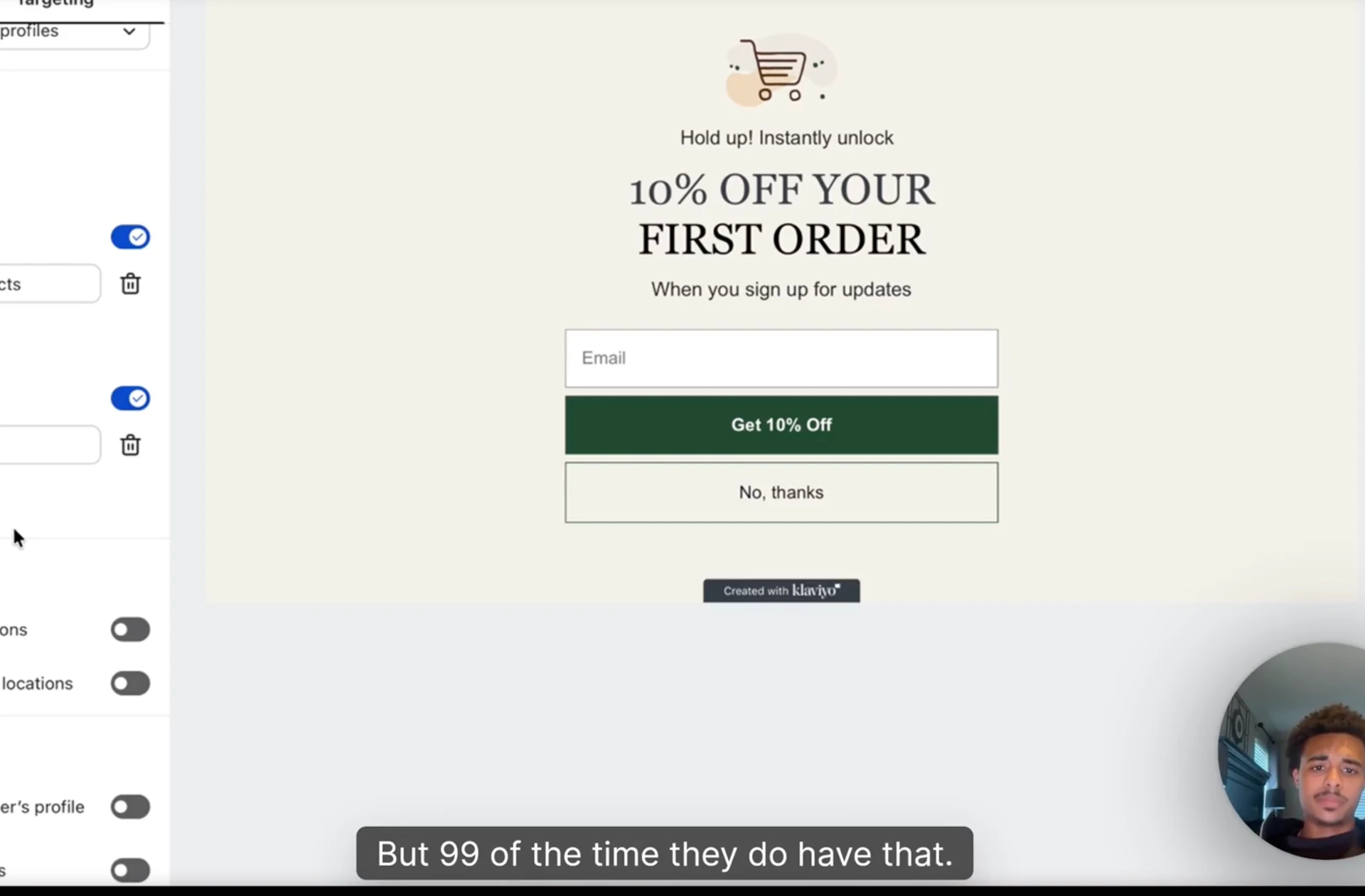
- Offer: 10% off for email + mobile capture
- Send mobile to TextCart / Postscript automatically
Why product pages only: advertorials and listicles already have their own conversion path. The popup interrupts the editorial flow and breaks the funnel. Set the popup to "show only on certain URLs" → product pages.
The Klaviyo popup default has two issues to clean up:
- Remove the SMS-only / email-only choice — capture both
- Toggle "show only on certain URLs" to filter out advertorial pages
If your store URL structure has advertorials at /pages/[slug], you can use a URL exclusion rule. If your structure varies, the cleanest solution is to whitelist only /products/* URLs.
Campaigns — every 2 weeks
After the flows are live, the only ongoing email work is campaigns.
Cadence: 1 campaign every 2 weeks. Don't do more unless you have a real reason (product drop, holiday, sale).
Campaign types:
- Text-only with good copy — what I default to. Doesn't take long. Performs well. Feels like a personal email instead of a marketing blast.
- Designed image with full email visual — for product drops, sales, hero campaigns
- Hybrid — short copy + one product image
For designed campaigns, use Claude + the imagen skill (covered in Module 3, Native sub-page). Same skill that generates static ad images generates full email designs. Drop in a reference design (from your swipe file or BrandSearch), prompt Claude:
"Generate a full campaign email design as a PNG using this reference. Same structure, same proportions. Insert our product where they have theirs. Three variations."
The clickable image rule: when you paste the campaign image into Klaviyo, make the whole image clickable with one URL — link to the product page. Easier than breaking it into sections.
If you want section-level click control (different links for different parts of the email), generate the image as 4-5 separate PNGs (top section, middle, CTA box, footer), upload each, link each to its specific URL. More work, sometimes worth it.
Don't sell every campaign
The temptation is to make every campaign a sales pitch. Resist.
Every other campaign:
- Educational / value-driven (tied loosely to the product)
- Founder POV / brand storytelling
- New blog post / content drop
- Customer story / testimonial
- Behind-the-scenes
Every fourth or fifth campaign:
- Direct sale or promo
Mix it up. Lists fatigue when you only sell. Long-term LTV improves when subscribers feel like they're getting something other than discount codes.
Cross-reference: the imagen skill (Module 3 → Native)
Everything image-related in this sub-page runs through the imagen skill I walked through setting up in Module 3 → Native sub-page. Same Google AI Studio API key. Same Nano Banana 2 model. Same Claude skill saved in your Customize → Skills sidebar.
If you skipped that section, go back. Without the imagen skill, you're either:
- Designing emails manually in Klaviyo's drag-and-drop (slow, mid output)
- Paying a designer per email (expensive, slow)
With it, every email goes from screenshot reference → Claude prompt → 3 PNG variations in 5 minutes.
What's gatekept inside the masterclass
This sub-page covers the foundation. The actual flow templates, copy, and advanced setups live inside the masterclass:
- Klaviyo flow templates (abandoned cart, welcome series, customer thank you with founders letter + order delay) — copy + structure ready to plug in
- Product drop campaign templates — old course video I'm porting in, covers product launch flow architecture
- Advanced segmentation by persona / awareness stage / past purchase behavior — when this is worth doing vs when it's overkill
- Campaign calendar templates — 12-week rolling cadence with content type rotation
- Email-specific Brandon-rule copy patterns — what AI tells to kill, what voice patterns work, what subject lines convert
- Live campaign breakdowns — what's running across my brands right now, what's hitting, what flopped
Want the full Klaviyo flow templates, the founders letter + order delay copy, the product drop campaign architecture, and the live campaign breakdowns I update biweekly? All inside the RunItUp Masterclass → Join here
Join now to lock in your rate, prices are increasing quickly.