The mistake most operators make
Most DTC operators run one campaign on Highest Volume and call it ad ops. They set a budget, let Meta spend it, watch the CPA fluctuate wildly day to day, and either celebrate or panic depending on which day they checked.
That's the surface. The actual leverage is running multiple campaign types in parallel, each doing a specific job in the structure. Highest Volume gathers data and forces momentum. Bid Cap locks in profitability and acts as a profit-juicer for losers. Run them together, transition correctly, and you stop being a single-strategy operator.
I've spent over seven figures on Meta — a meaningful chunk of it scaled with the structure below. This sub-page is the full breakdown of the three bid strategies, why Bid Cap is my favorite, and the campaign structure I run across all my brands.
The 3 bid strategies — quick framing
| Strategy | Optimizes for | Spend behavior | Best for |
|---|---|---|---|
| Highest Volume | Maximum events at any CPA | Always spends full budget | New brands, gathering data, forcing momentum |
| Bid Cap | A CPA cap you set | Spends only when profitable within cap | Profit-locked scaling, zombie campaigns |
| Cost Cap | Same as bid cap, looser | 7-day averaging, more spend | Operators who want bid cap with more flexibility |
Highest Volume — when to actually use it
Default Meta strategy. It's what every operator starts with because it's what every YouTube tutorial shows.
What it does: spend your full budget, attempt to get as many purchases (or whatever your optimization event is) as possible. Doesn't care about CPA. Will overspend on bad days, underspend on good days.
Day-to-day CPA looks like:
- Day 1: $12
- Day 2: $17
- Day 3: $63
- Day 4: $54
- Day 5: $22
No average. Just whatever Meta could squeeze that day.
When to use:
- New brand or new ad account — Meta has no data, can't run anything else
- New product / new offer — same reason, need to gather purchase data first
- Testing batches — fast spend = fast data
- Scaling proven creative — when you have a winner, force spend on it
Pros:
- Spends fast, gets data quickly
- Lets you test things at speed
- Required as a starter
Cons:
- Zero profitability control
- CPA fluctuates wildly with market conditions
- You eat the bad days
Brandon-rule: every new brand starts on Highest Volume. You cannot run any of the other strategies until Meta has enough data on your account.
Bid Cap — my favorite
This is the strategy I'd run on every brand if I could. It optimizes for the cap you set. You tell Meta "don't spend more than $X to acquire a customer," and Meta uses its predictive algorithms over a 24-hour window to allocate spend toward whatever's hitting that target.
Day-to-day CPA looks like:
- Day 1: $19.40 (cap is $20)
- Day 2: $18.70
- Day 3: $19.10
- Day 4: $19.85
- Day 5: $18.90
All averaging just below the cap. No fluctuation. That's the point.
Two outcomes only: either it doesn't spend, or it spends profitably. There's no third option where it spends but loses money.
When Bid Cap doesn't spend — 3 reasons
- Not enough purchase data in your ad account. Meta needs historical data to run predictive algorithms. If you're new, switch back to Highest Volume to gather data first.
- Cap is set too tight. Meta literally can't find anyone in your audience cheap enough to hit your CPA target. Raise the cap.
- Your ads are shit. Bid Cap doesn't fix bad creative. Nothing fixes bad creative. Make better ads.
When Bid Cap spends unprofitably — 2 reasons
- Cap is set too high — you set it above your real target, Meta is technically hitting the cap but you're losing money. Tighten the cap.
- Your ads are shit. Same answer.
How to set the cap
Two cap-setting approaches depending on stage:
Conservative starter (loose):
- Take your break-even CPA × 1.2
- This is your loosest cap — you're at break-even on first order, pulling profit from rebills/LTV
- Use this when you're not sure if Bid Cap will spend at all on your account
- Won't lose much money, lets you confirm the strategy works
Scaling cap (tight):
- Take your target CPA (the CPA that hits 20-25% net margin) × 1.1-1.2
- 30% multiplier is loose. 10-20% is tighter and locks margin harder.
- This is what I use across all my brands once Bid Cap is proven on the account
Math example from one of my brands:
- Cost of Goods: $10
- Sell price: $34
- Break-even CPA: $24
- Target CPA for 25% net margin: ~$16
- Bid Cap setting: $16 × 1.2 = $19
That's it. The cap is $19. Meta won't spend on anything that can't hit a $19 CPA.
Inflated Bid Cap — the scaling lever
This is the move that scaled one of my brands from $0 to $750k in 60 days. It's the secret most operators don't know.
The setup:
- Cap: stays at your target CPA (e.g., $20)
- Budget: set WAY higher than you expect to spend (e.g., $100k/day on a brand spending $10k/day)
- Strategy: Meta only spends what it can profitably acquire at the cap
What happens day to day:
- Day 1: Budget = $100k, Cap = $20. Meta finds enough profitable inventory to spend $12,000 at a $19.20 CPA.
- Day 2: Budget = $100k, Cap = $20. Tougher day in the auction — Meta only finds $7,000 of profitable inventory at $18.70 CPA.
- Day 3: New ads launched, they're crushing in the auction. Meta finds $73,000 of profitable inventory at exactly $20 CPA.
The principle: the inflated budget removes the spending ceiling. Meta only spends when it can hit your cap, but when it CAN, it has unlimited room to scale within profitability. Profitability is locked. Spend is uncapped (within reason).
This is the structure that lets you wake up to a $73k day at target margin without manually scaling. Meta scales for you, but only on profitable days.
The downside: budgets won't always spend. Some days you'll get $7k spent on a $100k budget. Operators who need to force-spend for momentum reasons will find this frustrating. For everyone else, it's the cleanest way to scale.
I was in the ad account maybe once every four days during the $0 → $750k run. Only thing I did was upload new ads. The inflated bid cap structure handles 90% of ad ops on autopilot.
Cost Cap
Same idea as Bid Cap but with a 7-day averaging window instead of 24-hour. Less strict.
| Day | CPA | Spend |
|---|---|---|
| 1 | $24 | $1,400 |
| 2 | $26 | $1,200 |
| 3 | $16 | $1,800 |
| 4 | $20 | $1,500 |
| 5 | $19 | $1,400 |
| 6 | $22 | $1,300 |
| 7 | $14 | $1,600 |
Over 7 days, averages out to roughly your $20 cap. Spend is more flexible day-to-day, total spend tends to be higher than Bid Cap on the same budget.
Inside Meta it's labeled "Cost Per Result Goal" now (used to be called Cost Cap, that's why operators still call it that).
Brandon's take: I prefer Bid Cap because I want to optimize for profitability strictly. If I want it looser, I just raise the Bid Cap setting. Some operators love Cost Cap for zombie campaigns specifically because the looser averaging gives more spend flexibility on dead ads. Try both, find what your account responds to.
My actual campaign structure
This is what I run across every brand. Two CBO campaigns running in parallel, each with a specific job.
Campaign 1 — Highest Volume CBO (testing + scaling)
Standard CBO on Highest Volume. This is where:
- New ad batches launch — fast spend gets data fast
- Proven winners scale — momentum-driven scaling for ads that already work
- Audience testing happens — different audiences, lookalikes, broad
This is the entry point for everything. Every new ad starts here.
Campaign 2 — Bid Cap CBO (the "Zombie Campaign")
Same audience targeting, identical ad sets, but Campaign Bid Strategy = Bid Cap. Cap set at your scaling target (target CPA × 1.1-1.2).
This is where losers from Campaign 1 go to die — except they don't always die.
The play: when an ad in Highest Volume hits high CPA or stops spending, instead of pausing it, quick-duplicate the ad and drop it into the Bid Cap campaign. Bid Cap will only spend on it if it can hit profitability.
What happens:
- 70% of the time, the ad doesn't spend. Confirmed loser. No more money lost.
- 30% of the time, the ad spends and is profitable. Sometimes at 3-5x ROAS. It wasn't a bad ad — it was an ad whose audience pocket Highest Volume couldn't find.
This is the cleanest profitability-juicing move you can run. I promise — set this up today, you might wake up tomorrow morning to a 5x ROAS on an ad you were about to kill.
Even duplicate winners into the zombie
Advanced layer: take your winning ads from Highest Volume and duplicate them into Bid Cap too. Now you have the same winner running in both campaigns. The Highest Volume copy spends aggressively. The Bid Cap copy only spends on the most profitable pockets. You're extracting maximum margin from already-working creative.
I do this on most of my brands now. No downside other than slightly more campaign management overhead.
The eventual transition
Once Bid Cap is consistently spending and profitable, you transition entirely to Bid Cap. Drop Highest Volume except for the occasional new-batch test.
At that point, ad ops becomes:
- Upload new ads
- Watch what Bid Cap picks up
- Focus on creative output
- Eat profits
That's the endgame structure. Most of my brands run there once Bid Cap is proven on the account.
The setup walkthrough
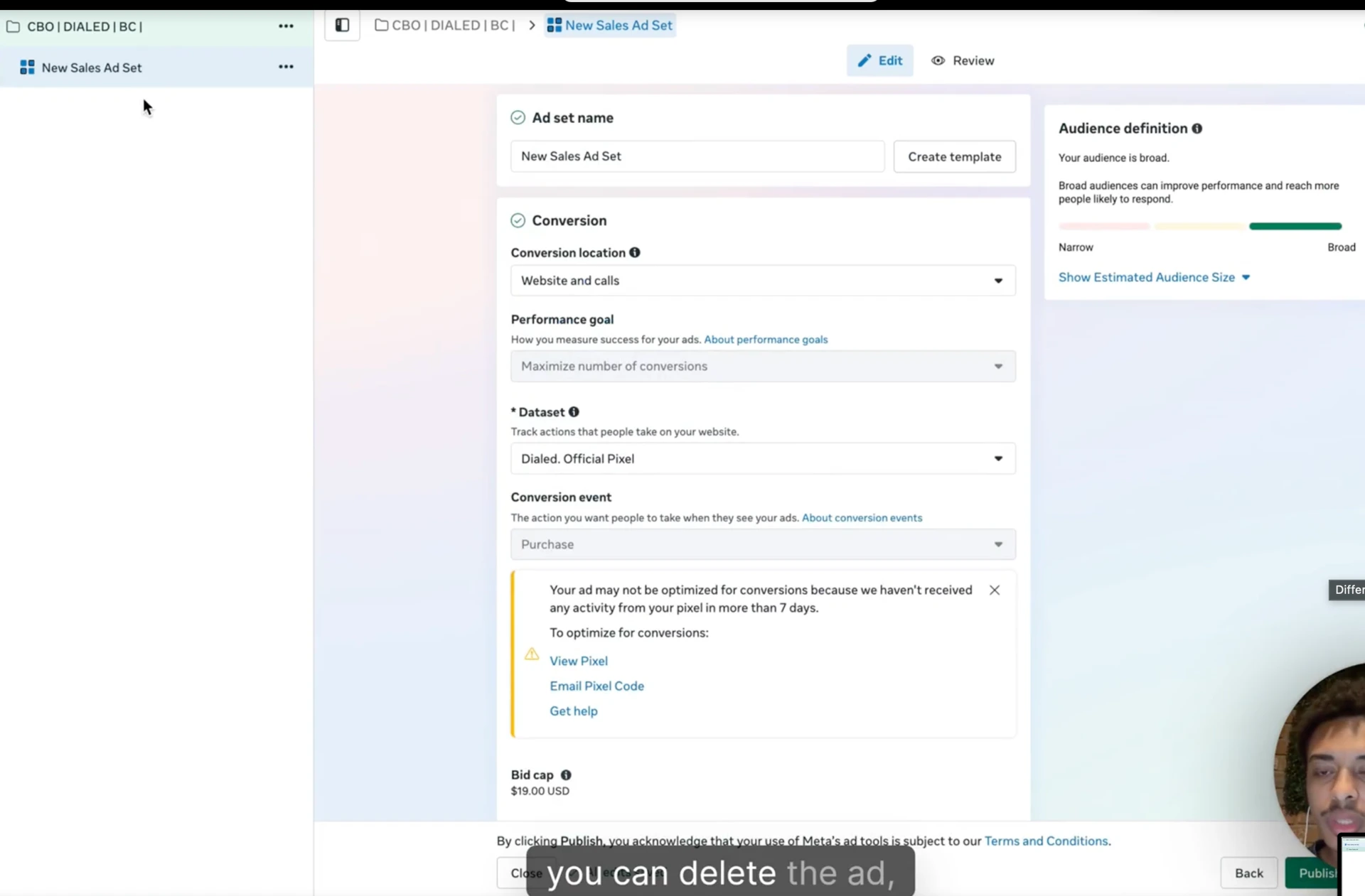
If you're new to Bid Cap, the only confusing part is where you set it. Here's the 30-second version.
Campaign level:
- Create new CBO campaign
- Same setup as your Highest Volume campaign (objective, optimization event, etc.)
- Find Campaign Bid Strategy → click → select Bid Cap
- (For Cost Cap, select "Cost Per Result Goal")
Ad set level:
- Inside each ad set, find the bid cap input field
- Enter your dollar amount (e.g., $19 from the math example above)
Populate the campaign:
- Go back to your Highest Volume campaign
- Quick-duplicate the ads you want to test in Bid Cap
- When the duplication dialog asks where to send them, choose your Bid Cap campaign
- Done
For zombie campaign use: as ads die in Highest Volume, quick-duplicate them into Bid Cap. They'll either spend profitably or sit there not spending. Either way, you win.
Bid Cap doesn't fix bad creative
Said it twice already, saying it again. Nothing fixes bad creative. Not Bid Cap. Not Cost Cap. Not the inflated structure. Not whitelisting. Not different audiences.
Creative quality is the bottleneck on every account I've run, every account I've audited, every account I've consulted on. The whole game upstream of campaign structure is making better ads (Module 3 → Catalyst, Native, Videos, Advertorials).
If your account is struggling and you're tempted to chalk it up to "the strategy isn't right" — it's almost certainly the creative. Fix the creative first. Then the structure work I'm describing in this sub-page actually amplifies what's working.
What's gatekept inside the masterclass
The principles are here. The artifacts live in the masterclass:
- Live campaign structure screenshots — actual campaign and ad set setups across my brands, with cap settings visible
- The 0-to-$750k-in-60-days inflated bid cap walkthrough (full case study with the daily breakdown)
- Cap-setting calculator — plug in your COGS, AOV, target margin, get the right cap automatically
- Transition timing — when exactly to move from Highest Volume → Bid Cap → Bid Cap-only on your account
- Live ad account audits — biweekly walkthroughs of what's running, what changed, what worked
- The advanced zombie campaign structure — multi-cap layered campaigns for accounts spending six figures/day
Want the live campaign structures, the 0-to-$750k case study walkthrough, the cap-setting calculator, and the biweekly account audits? All inside the RunItUp Masterclass → Join here
Join now to lock in your rate, prices are increasing quickly.