The community fills up. Creators get product. The first videos start rolling in. And they're... mediocre.
This is the bottleneck that kills most affiliate communities at scale. You spent the time to build the system, you've got 50+ creators in, and the content quality is wildly inconsistent. Some creators understand brand voice and direct response structure. Most don't. And you can't onboard each one personally.
The fix is the training course. Built once, hosted in the community, every new creator goes through it. By the time they make their first piece of content, they understand the basics of UGC, how to structure a hook, what your brand voice sounds like, and how to use AI to generate scripts.
This sub-page covers the course itself + three other components of training creators at scale: briefing them for content, running the B-roll on demand mechanic at volume, and identifying and promoting top performers into retainer roles.
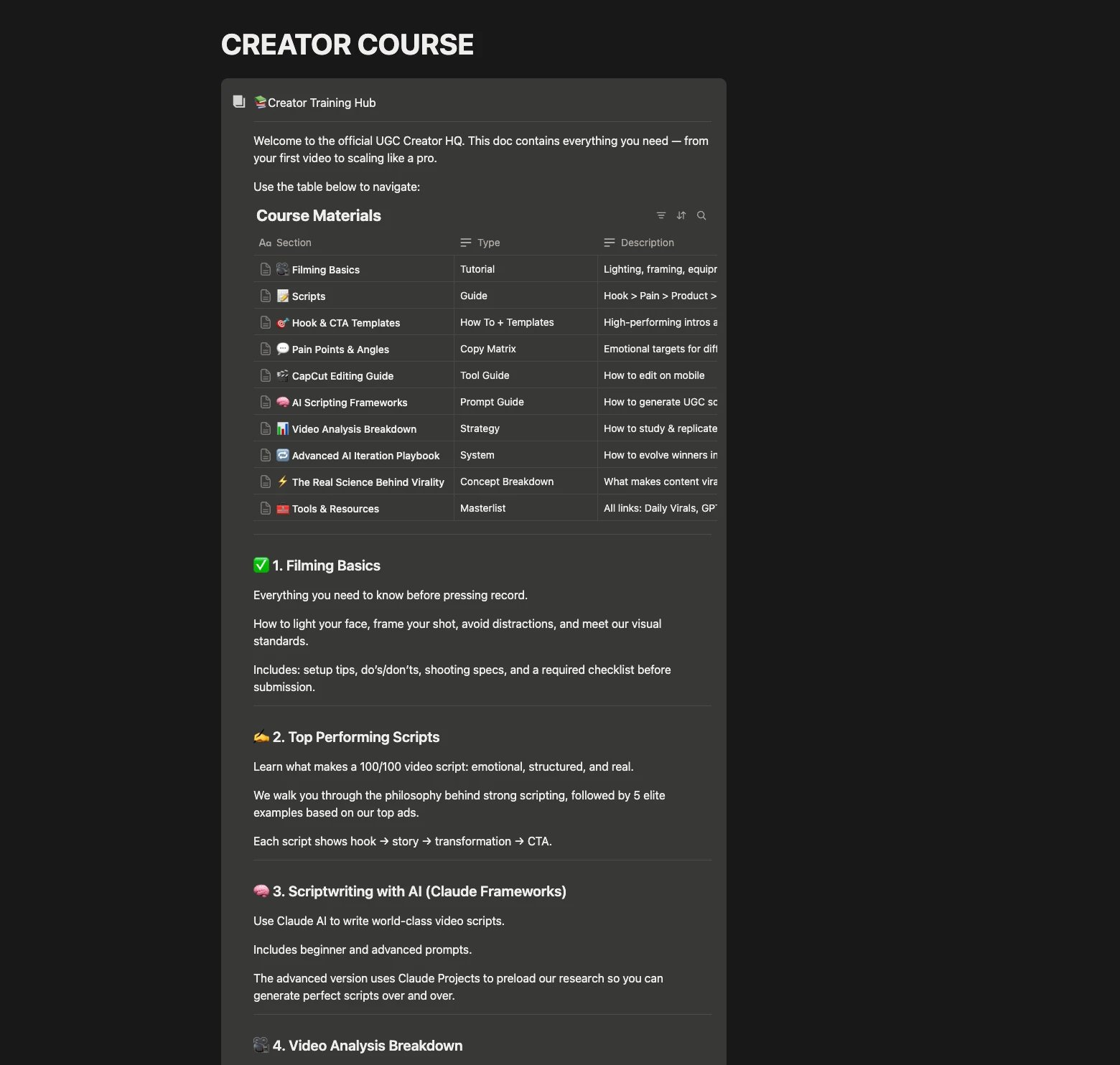
The UGC course — a plug-and-play Notion template
The course started as an accident. I was using ChatGPT to draft a regular Notion doc explaining how to make UGC for one of my brands. ChatGPT got carried away coding it up with structure, sub-pages, embedded links, examples, all of it. By the time I noticed what it had built, I had a complete UGC course living in Notion.
I cleaned it up, used it for my own brand, and then turned it into a plug-and-play template for the masterclass.
What's inside the course
The course covers everything a brand new creator needs to make content that converts:
- What makes a good UGC video — the structural breakdown (hook, product intro, mechanism reveal, CTA — same as Module 1's main page)
- How to film and how not to film — lighting, framing, audio, pacing
- Example videos — links and files showing winners and explaining why they worked
- Hook templates — copy-paste hook structures organized by avatar and angle
- CTA templates — the call-to-action library
- How to prompt AI for content — which AI to use for what (script generation, hook ideation, brand voice matching), and the actual prompt structures
- Advanced Claude scripting — building Claude projects for content creation, iteration playbooks for refining scripts before filming
- Tools and resources — the recommended creator stack (Creative OS, CapCut, Claude, etc.)
The course is broken into sections that can each become an individual video module when you film a video version later (more on that below).
How to customize it for your brand
The Notion template is structured so you only need to make small brand-specific tweaks:
- Replace example videos with your own winning content. The template comes with placeholders — swap them for videos that worked for your brand.
- Customize the hook and CTA templates with your brand voice. Keep the structures, change the language.
- Update the "what makes good UGC for our brand" section. Specifics about your product, your avatar, your angles.
- Add affiliate links to every recommended tool. This is the part most operators skip — for every tool the course recommends to creators, get an affiliate link. Stack pennies on top of pennies. Over a year with hundreds of creators clicking those links, the affiliate revenue is real.
You can leave the rest of the course generic and it'll work fine. The whole customization process takes 1–2 hours.
If you want to move faster, you can now use the Claude + Notion connector to do most of the customization automatically. Connect Claude to your Notion workspace, point it at the template, and prompt Claude to rewrite the brand voice sections, swap in your examples, and adjust the hook templates for your avatar. What used to be 1–2 hours of manual editing becomes 15 minutes.
This whole case study you're reading was built with Claude + Notion connector. Same approach works for any internal doc, SOP, or template system you need to spin up fast — I'm using it right now to build out new internal systems for my brand.
The evolution: video version once you're scaled
The Notion course works. New creators can read it, get up to speed, and start producing.
But once you've got real volume — 50+ creators in the community actually producing content — upgrade the course to a video version.
You have two options:
- You film it yourself if you're already the face of the brand (founder-led brand, you're on the brand's content, etc.)
- Take your top creator from the community, pay her to film it if you're not the face of the brand. Same content, in her voice, with her face. Way more authentic for new creators to watch.
The video version doesn't need to be polished. iPhone, decent lighting, clean audio. What matters is that the content gets across. Each section of the Notion course becomes a 5–15 minute video module. The full course ends up being maybe 90 minutes of total content split across 8–12 videos.
Why the video version is better than Notion:
- New creators consume it faster. Watching a 90-minute course over a couple of days is easier than reading a Notion doc.
- Authenticity carries. Your top creator explaining UGC to new creators feels peer-to-peer, not top-down.
- It's the same logic as this case study. What you're reading is the Notion version. The masterclass is the filmed-by-the-operator version.
Same playbook applies to the UGC course. Scale up to video when you have the volume to justify it.
Briefing creators for content
Once creators are trained, the day-to-day operation is briefing them on what content to make.
The mechanic was covered in the previous sub-page (Building the Community → #content-briefs). The short version:
- You or your creative strategist drops content briefs into the #content-briefs channel.
- Briefs live in Milanote (visual brief format) or as detailed text.
- Each brief @mentions everyone, gets the community's attention.
- Creators pick briefs they want to work on, film, and submit.
Briefs are how you direct the engine. Without briefs, creators make whatever they want, which is often off-brand or off-strategy. With briefs, you can request:
- A specific ad concept that needs UGC (test angle, product variant, new hook)
- A reaction to a winning ad or piece of viral content
- A specific format (testimonial, day-in-the-life, problem-solution)
- A specific avatar segment ("we need more parenting moms" / "we need more fitness creators")
The brief format itself — the actual Milanote template my team uses to direct the community — is gatekept inside the masterclass.
B-roll on demand at scale
Already covered architecturally in the Building the Community sub-page (#winning-ads channel). Here's how to actually run the mechanic at scale once your community is big enough.
The trigger: you have an ad that's working. Could be a creator's submission that's spending well, could be a piece you produced internally, could be something that went viral organically. Whatever it is, you've identified that this format converts.
The play:
- Post the winning ad in #winning-ads. Provide context: why it works, what's selling, what specifically you want creators to remix.
- @everyone with a deadline. "Remake this in your own voice. Submit by Friday."
- Drop a brief alongside it. Specifics on the format: keep the hook structure, swap the avatar, can change the CTA wording, etc.
- Wait 48 hours. You'll get 30+ remakes from creators in the community.
- Process and ship. Your video editor reviews, picks the strongest 10–15, your team uploads to ad accounts.
At scale, this is the cheat code. One winning concept generates 30+ ads in 48 hours. Each remake routes through different avatar segments and different audience pockets, extending the lifespan of the original concept by weeks or months.
This is what COMFRT does. This is what the brands you watch in your Facebook feed every day are doing. It's not a creative strategy — it's a content multiplier on top of one creative strategy.
Identifying and promoting top performers
The commission tier structure (Base → Mid → High → Elite) was covered in the Building the Community sub-page. The mechanic for promoting creators between tiers is mostly automatic — based on attributed sales thresholds, you bump them up.
The non-automatic part: identifying who's worth putting on retainer.
Most operators stop at "elite tier creator with high sales attribution." That's not the same as a retainer-worthy creator. The retainer creators are the ones who:
- Have an audience that converts. Their attributed sales come from their organic content, not just from people clicking their link.
- Understand your brand voice intuitively. They produce content that matches your brand without needing constant briefing.
- Are reliable. They submit on time. They follow content guidelines. They don't go off-script.
- Want a deeper relationship with the brand. They engage in the community, ask thoughtful questions, treat the brand like a partner instead of a transaction.
When you find these creators — and you'll know them when you see them, usually 2–5% of your active community — bring them on retainer. Pay them a monthly base + commission. Have them run dedicated content pages for your brand on TikTok and Instagram. Give them inside-track access to upcoming launches and product variants.
These retained creators become a permanent part of your B-roll and content engine. They're also the pool you draw from when you eventually film the video version of the UGC course.
When this all clicks
The full system, when running:
- Lead ads fill the form (cheap, predictable applicant flow)
- Singwell contracts filter the unqualified out (V2 update)
- Shopify Collabs onboards approved creators automatically (V2 update)
- Discord onboards them through the verification + start-here flow (Carl-bot gated)
- UGC course trains them in basics (Notion template → eventually filmed video)
- #content-briefs directs them to specific concepts to make
- #winning-ads triggers B-roll on demand whenever you find a winner
- Top 2–5% get pulled onto retainer and run brand pages full-time
The whole thing runs without you in it day-to-day. You drop in once or twice a week to react to wins, drop a brief, post a winning ad. The rest happens through your IFVA, your team, and the community itself.
This is what the brands at the top of your feed are doing. This is the playbook.
What's gatekept
Everything tactical in this module — the architecture, the system, the V2 updates, the playbook for running it — is fully laid out across the four sub-pages of Module 1. What's not in the case study, and lives only inside the RunItUp Masterclass:
- The UGC course Notion template — the plug-and-play one I described in this sub-page
- The IFVA welcome scripts for every Discord channel
- The Discord verification message + Carl-bot exact config
- The Singwell contract template for creator agreements
- The Google Form template with App Script automations for routing
- The Milanote brief template my creative strategist uses
- The leaderboard announcement format + reward tier scripts
- The full Discord setup SOP — channel-by-channel build out
If you want any of those, they're inside the masterclass.
Or — and this is what most operators will end up doing anyway — you can build your own using the architecture in this case study + the Claude + Notion connector. Same way I built this case study, same way I'm building out new internal systems for my brand right now. The architecture is the moat. The templates are the shortcut.
End of Module 1
That's the entire affiliate and UGC creator community playbook. The system that allows brands like COMFRT, Neuro, and MEDV to scale to nine figures on community-driven content. The system I'm running on my own brand right now.
The next module — Teams, Hiring & SOPs — covers how to actually build out the team that runs this and every other system in your brand. Who to hire, in what order, how to write SOPs that don't suck, and the playbook for replacing yourself out of every operational role.
Want the full, video version? Every SOP, notes, extra information, plus calls & a chat with me inside our 1,000+ member community — here inside the RunItUp Masterclass → Join here
Join now to lock in your rate, prices are increasing quickly.